

Check + Next Workers' Compensation Integration Guide
Introduction
Next Insurance is an online insurance platform that helps small businesses find instant coverage for workers' compensation insurance. In addition to traditional workers’ comp policies, where the premium is based on an estimated annual payroll, Next offers “pay-as-you-go” insurance, which systematically calculates premiums using actual payroll data every pay cycle. These policies are particularly attractive for customers to attach to their payroll provider.
The Check + Next Integration enables you to offer your customers workers’ comp insurance directly in your platform in less time than a traditional integration, enabling you to:
- Quickly test for product-market-fit
- Differentiate your payroll product by adding an embedded insurance offering
- Add a new revenue stream for your business
The component is a Workers' Comp insurance hub with three paths your customers can take from a single entry point — buy a new policy, switch their broker of record (BOR) to Next, or connect an existing Next policy — plus informative status screens that show real policy details once a customer is with an agent or enrolled.
Implementation Timeline ExpectationsIn order to test the Next Insurance component, Check requires additional information to properly stage you in Next Insurance. Additionally, in order to launch the Next Insurance component in production, you may need to sign a contract amendment.
This implementation process may take up to 2 weeks to complete.
If interested in using our component, please reach out to your Check representative to get this implementation process started.
Launching the Next Insurance Component
The integration to Next is served through a Check Component, which is an embeddable piece of UI that you can embed directly into your product via an iFrame (see Embedding a Component Guide).
To generate the Next Insurance Component, make a POST request to the following endpoint.
https://sandbox.checkhq.com/companies/{companyId}/components/integrationsInclude the following in the body of the request:
{
 "integration_partner": "int_Fffk6nOGSHtuCTirWqlp", // use this exact ID for the Next integration
 "email": "[email protected]" // use a unique email here
}
Note: Next requires that an email be associated with any company going through their buying funnel. To enforce this, Check enforces that an email be present on the company object, or passed through in the request body to generate the component link. If both are present, Check will send the email in the request body through to Next.
Next Experience Walkthrough
The discovery hub
On first load, the Component surfaces a Workers' Comp coverage hub. Instead of a single "buy a policy" path, the customer is presented with three explicit options, each suited to where they are with workers' comp today:
- Get a plan — for a business with no workers' comp coverage. Launches Next's quote-to-purchase funnel.
- Switch broker to Next (BOR) — for a business that holds a workers' comp policy with another carrier or broker. Starts a broker-of-record transfer to Next, in-component.
- Connect coverage — for a business that already holds a Next policy. Connects the existing policy to Check so premiums sync from payroll.
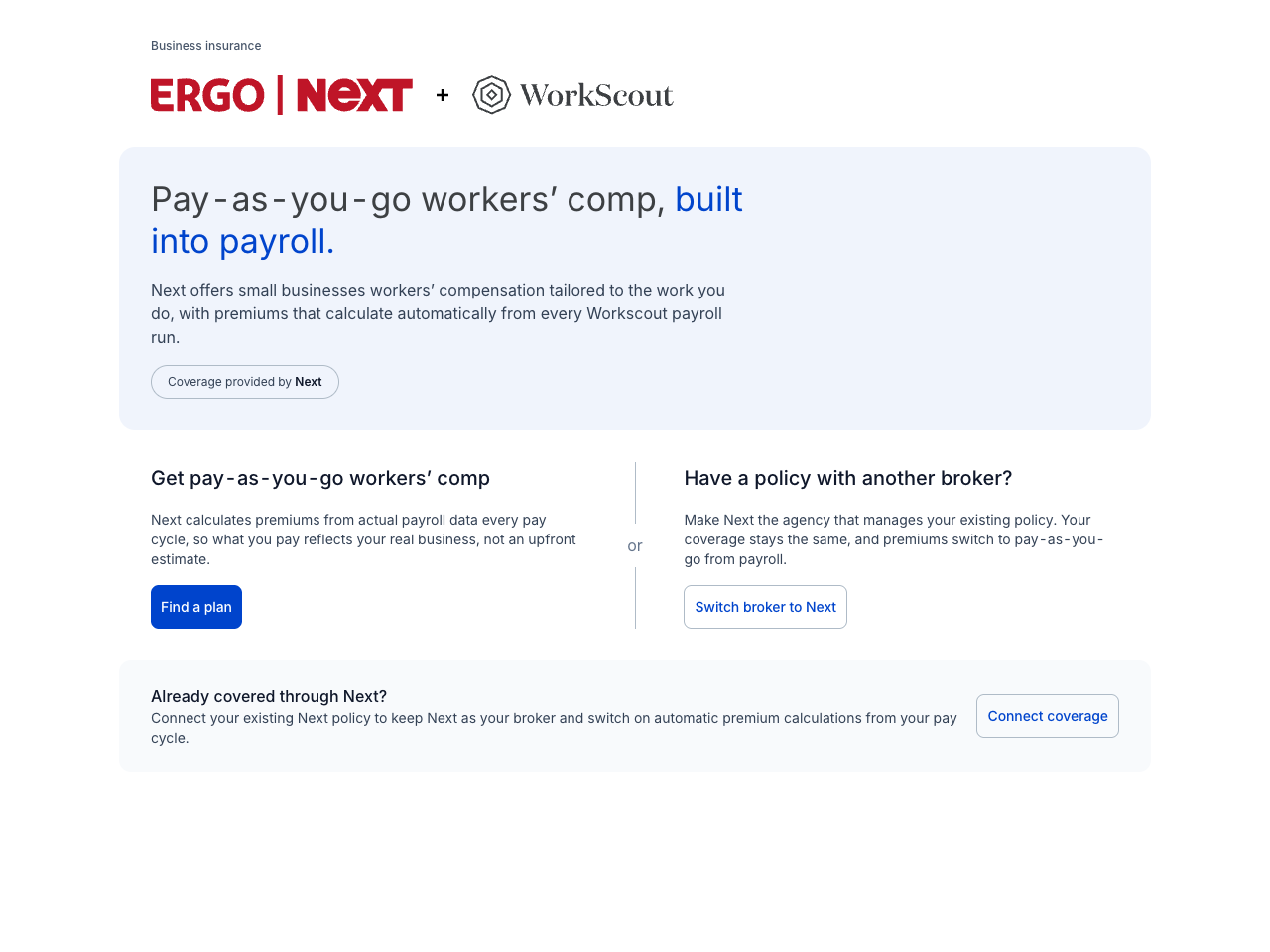
What changed from the previous componentThe previous component offered two options and used "Connect coverage" to start a broker-of-record switch via an offline phone handoff. In this version the paths are explicit and separate: Connect coverage is now for businesses that already have a Next policy, and the broker-of-record (BOR) transfer is its own in-component flow (no phone call required — see below).
Path 1 — Get a new plan
-
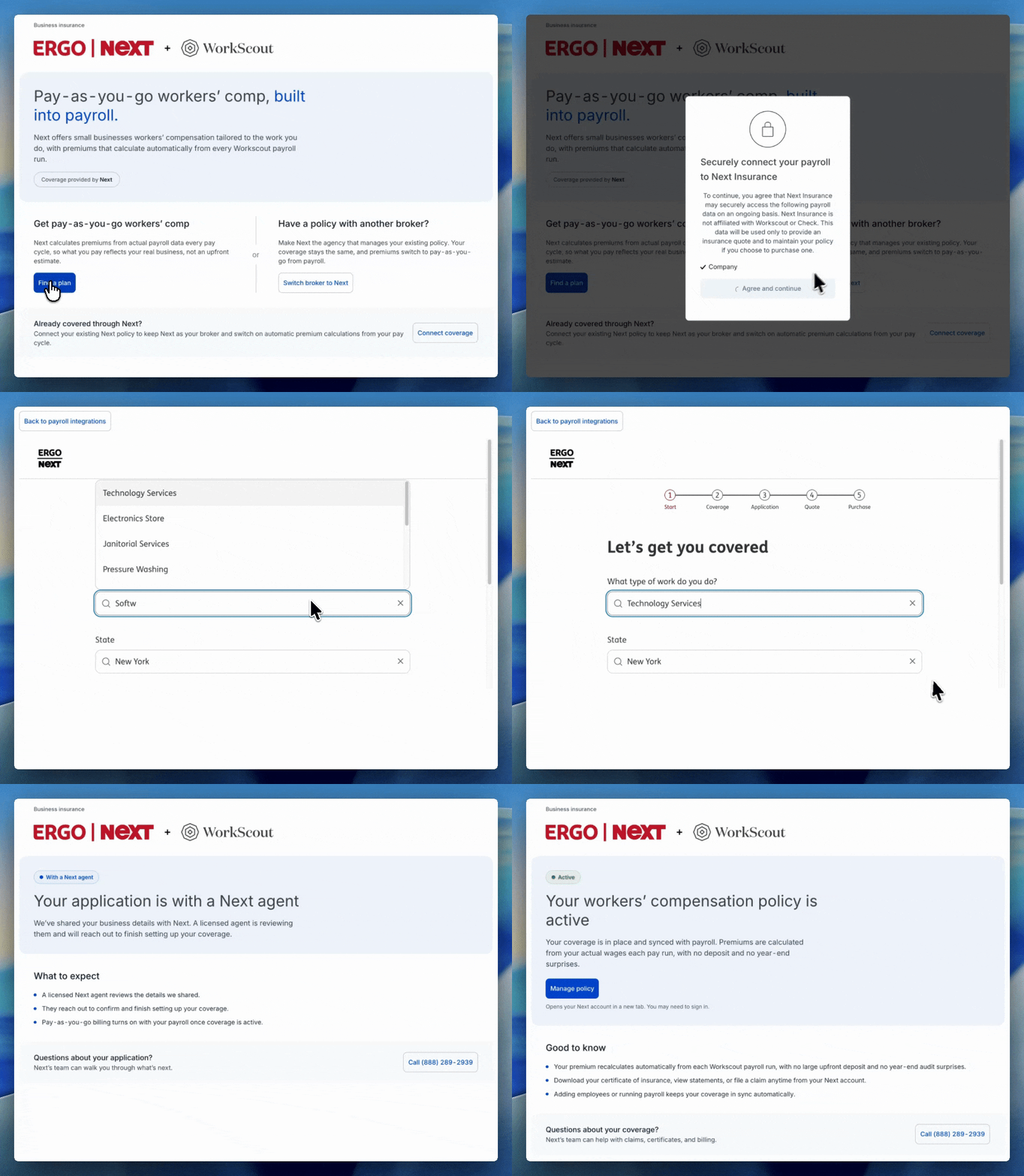
Selecting Get a plan surfaces a modal that collects authorization from the user, allowing Next to securely connect with Check to view company information and payroll data. This information is used to calculate a quote accurately.
-
After authorization, the Next quote funnel loads. To streamline the buying experience, Next prefills information with data it collects from Check about the company (e.g. business name, phone number). Refer to this list of all pre-filled fields.
Dummy Data in SandboxUse the following inputs to go through the entire quote funnel in sandbox.
- If a user drops off in the funnel, Next saves the session and lets them pick back up where they left off the next time they enter the Component. The Component surfaces a "Continue where you left off" prompt that also re-exposes the three discovery options.
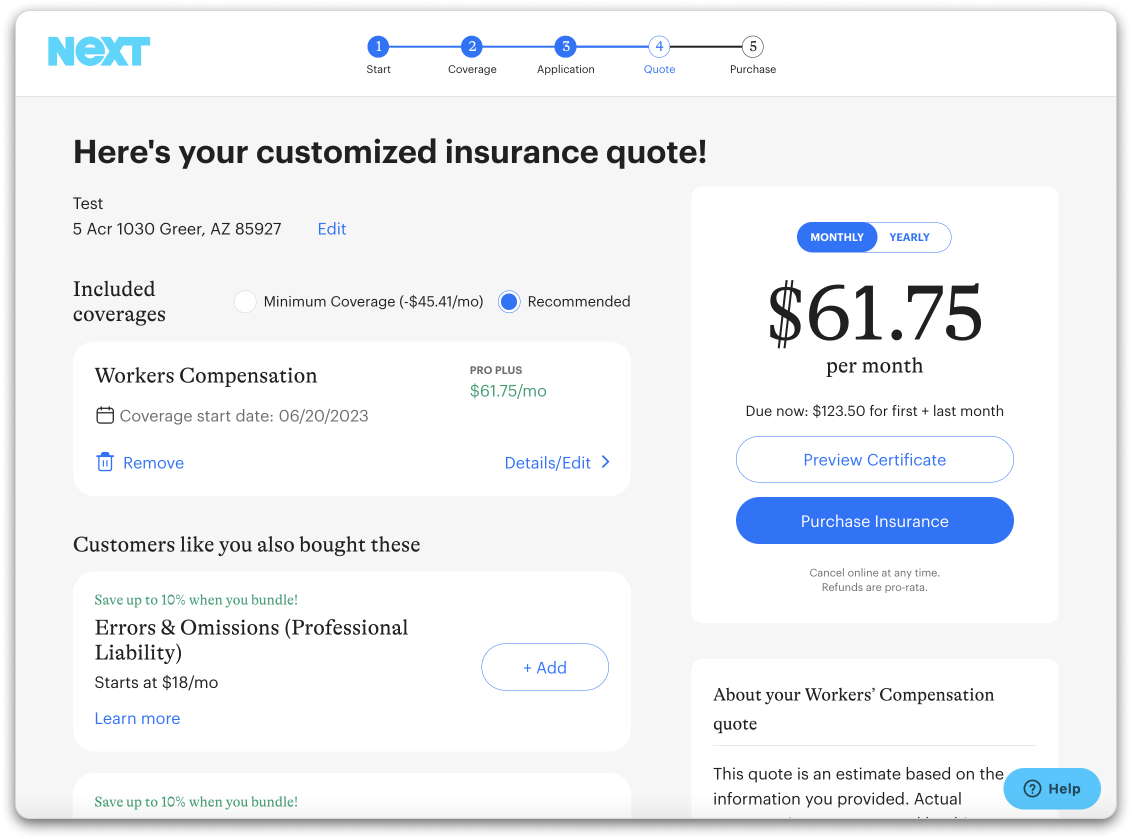
- After the user completes the application, Next generates a quote that your customers can purchase within the Component directly.
Path 2 — Switch broker of record (BOR) to Next
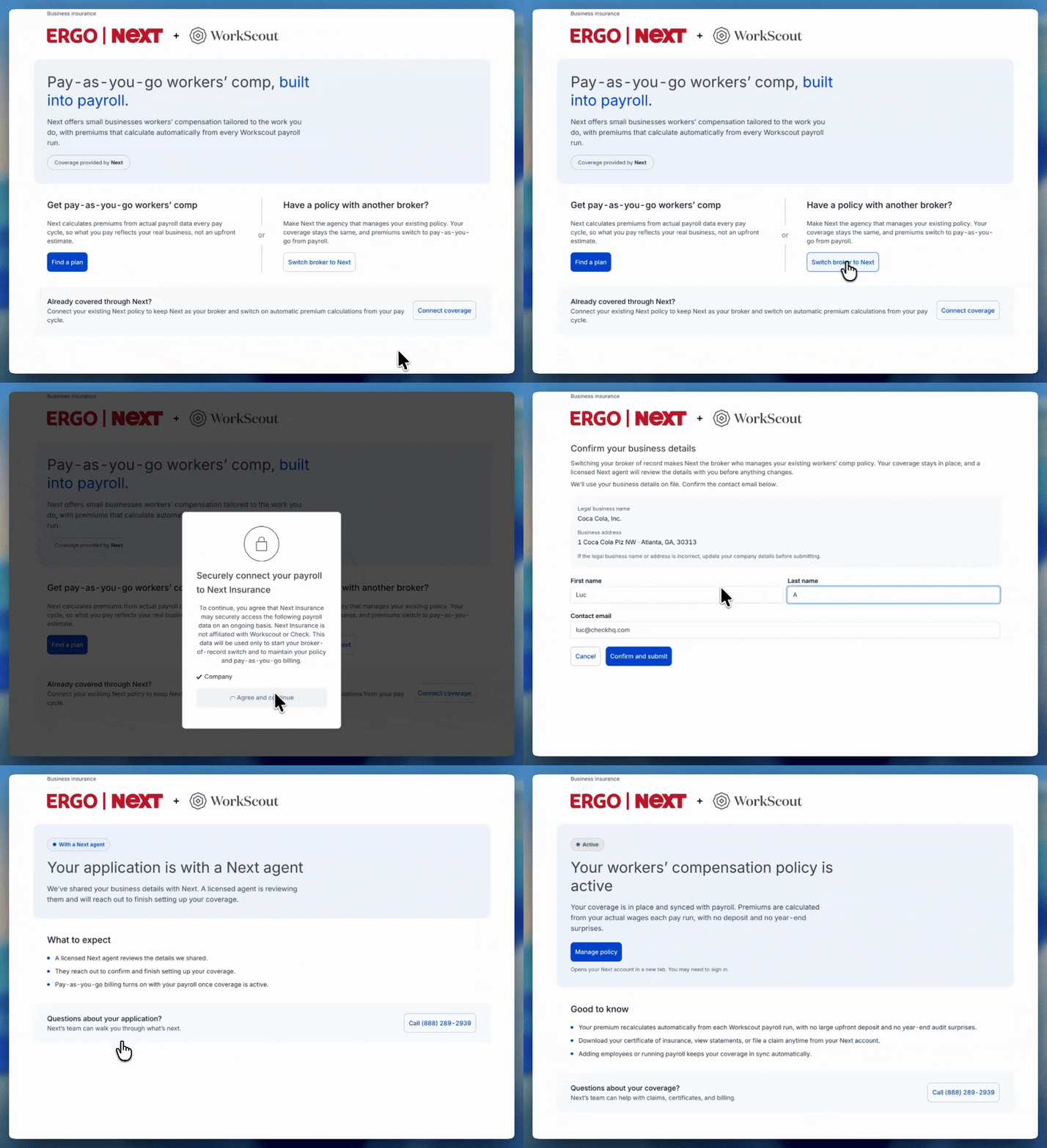
For a business that holds workers' comp with another carrier or broker, Switch broker to Next starts a broker-of-record transfer in-component — no offline phone handoff. The Component opens a short confirm-and-submit form, prefilled from the company's details, and on submit creates the lead with Next and notifies a licensed Next agent to complete the switch.
After submitting, the Component renders an informative with-agent status so the customer always knows where they are in the process (this used to be a blank screen).
Path 3 — Connect an existing Next policy
For a business that already has a Next policy, selecting Connect coverage runs an authorization handshake (the business grants Next access / integration access) so Check can sync the policy and turn on pay-as-you-go billing from payroll. This replaces the prior email-only prompt.
Enrolled — "Your coverage"
Once a policy is active (whether bought through the funnel or completed via a BOR switch), loading the Component reflects the policy state with a real "Your coverage" view: carrier, premium, billing type, and coverage period, plus a Manage policy link to Next's dashboard and a certificate of insurance (COI) download. We recommend embedding the Component wherever you let employers view and manage their payroll settings, or in a dedicated "integrations" tab.
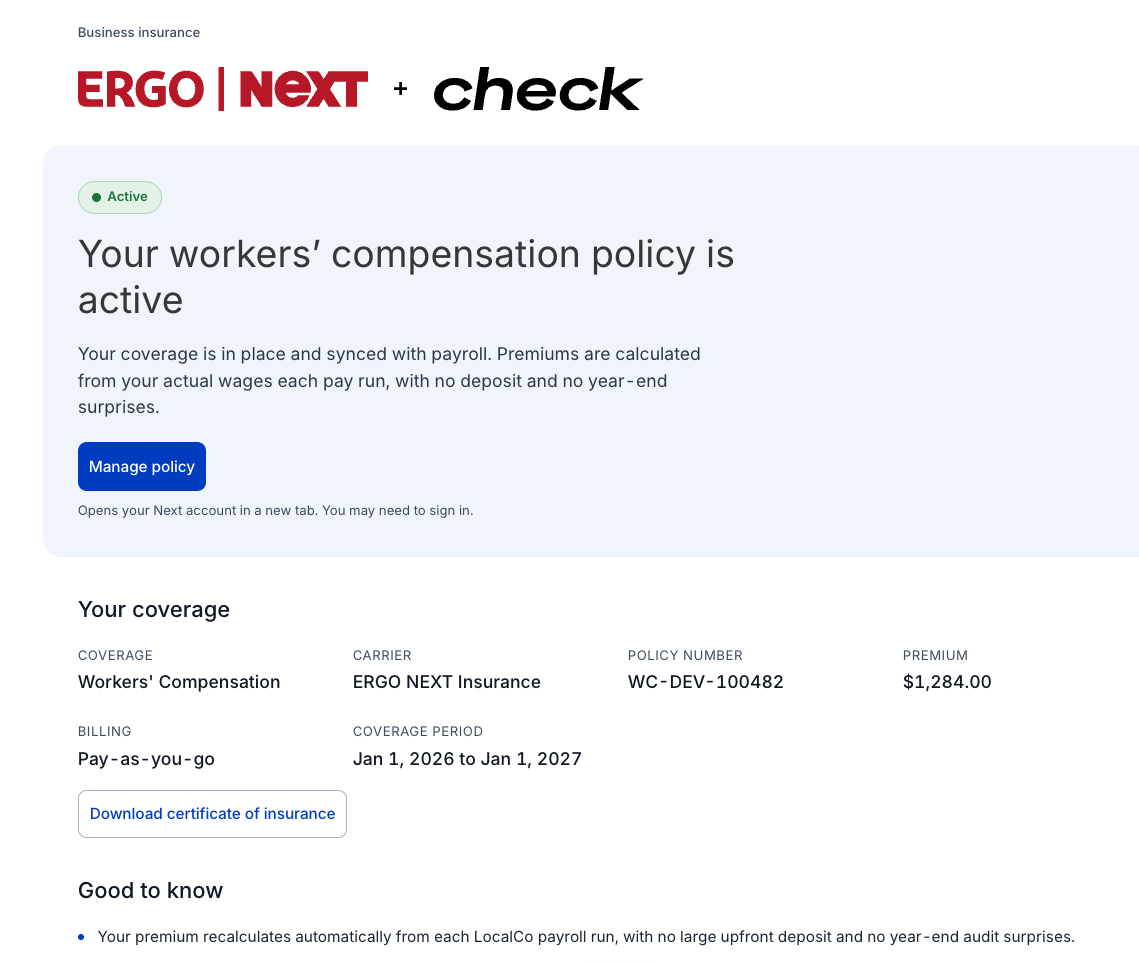
From Next's dashboard (via Manage policy), customers can also:
- View their Certificate of Insurance
- Update policy info
- Update account info
Next Policy Status
The List Integration Accesses endpoint lists all active integrations. You can also leverage the company query parameter to retrieve the status for a single company.
https://sandbox.checkhq.com/integrations/accesses?company={companyID}You can expect a response that includes a field called access_type which reflects a company's status with Next.
| State | Condition |
|---|---|
PROSPECT | The user has authorized access to their data in Check and has successfully entered the Next quote funnel. |
QUOTE_GENERATED | Next has successfully generated a quote and surfaced it to the user in the Next funnel. |
WITH_AGENT | The user is working with a Next representative. This is the status for a broker-of-record transfer from the moment the in-component lead is submitted until the switch is complete, and any time the user is directed to a Next agent in the funnel. |
POLICY_PURCHASED | The user has an active workers' comp policy with Next. For a broker-of-record switch, POLICY_PURCHASED is set upon completion of the switch. |
Customer Support
Next ensures that at every step of the funnel, a user has the ability to get in touch with their support team. It's important to call out that you, as a partner, are not authorized to answer questions or provide recommendations on plans on behalf of Next. You must always direct the customer to Next's support for anything related to insurance.
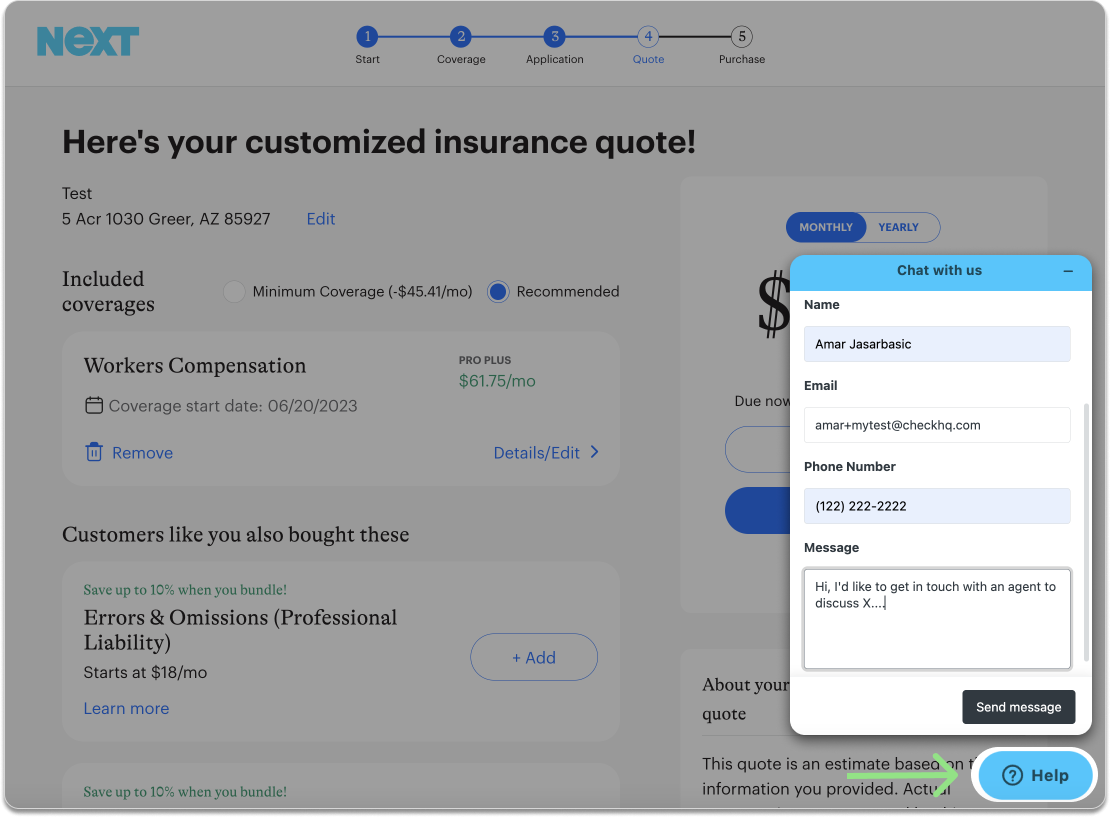
Pre-filled Fields
Below is a list of fields that are already collected by Check for payroll and pre-filled in the Next quote funnel.
| Field | Type | Description |
|---|---|---|
| String | Email address of the contact person at the business | |
| businessName | String | Name of the business |
| firstName | String | First name of the contact person at the business |
| lastName | String | Last name of the contact person at the business |
| phone | String | Phone number of the contact person at the business |
| yearBusinessStarted | String | For example 2019 |
| annualPayroll | String | Total payroll gross pay for all employees in a year |
| numOfEmployees | Int | No. of employees employed by the business |
| industry | String | The category of business, e.g Construction |
| payrollStartDate | String | Date when payroll starts (format YYYY-MM-DD) |
| businessOwnershipStructure | String | The type of business structure: LLC, Corporation, Trust, etc. |
| businessActivity | String | The actual tasks performed on a daily basis |
| streetAddress | String | Actual street address of the location |
| city | String | City of the location |
| state | String | 2-character abbreviation state name |
| zip | String | 5-digit zip code of the location |
| officers | Array | List of officers at the business |
Contractor-Only Payrolls & NEXT AlertsPayroll runs that contain only contractor (1099) payments and no W-2 wages do not send payroll data to NEXT Insurance, since contractors are not reported for workers’ comp.
If an employer goes longer than their payroll frequency without paying W-2 employees, NEXT may interpret this as missing payroll and send late payroll alerts or initiate policy cancellation — even if contractor payrolls are being run successfully.
To avoid this, NEXT recommends either making a $5 minimum premium payment during these periods or moving the policy to direct bill. For assistance, contact [email protected] .
Updated 4 months ago