

Balancing Payrolls & Fulfillment Receipts
This guide walks through how to build quarter-end balancing transparency into your product using the Fulfillments API — so each employer understands what's being collected or refunded, and has their tax receipt, before any money moves.
Overview
At the end of every quarter, Check performs a process called balancing where for each company we reconcile the taxes collected and remitted during the period against the actual amounts owed based on final, quarter-end calculations. Check generates a balancing payroll for every company — a system-generated payroll that adjusts company and employee tax balances so we can file accurate returns. For most companies the balancing payroll nets to $0.00. However, when the reconciliation surfaces a difference, the balancing payroll carries that variance.
When a balancing payroll has a variance, Check creates a Fulfillment — a record of the transaction that settles it. A Fulfillment is created for any variance, not only those that move money. A fulfillment may carry a cash requirement (Check debits or refunds the employer's default bank account), an agency refund (the employer is refunded directly by the tax agency, with no Check transaction), or both. This guide outlines the recommended patterns for surfacing balancing payrolls and their fulfillments to your employers, so they understand what's happening and when — before the money moves.
Why this matters
- Balancing transactions are unfamiliar to most employers. Without proactive communication, they can generate support tickets.
- Funds don't move the moment a balancing payroll is approved. Approval occurs on the 2nd business day of the filing month and the debit/refund is processed on the 8th business day of the filing month — a 6-business-day head start to educate the employer before any money moves. See the Quarter-End Playbook for exact dates.
- This experience has become a major differentiator for partners during quarter-end.
Quick Reference: The Recommended Flow
- Subscribe to the
fulfillment.createdwebhook. - On receipt, fetch the fulfillment (Get a fulfillment) and confirm
fulfillment.type == "balancing". - If
fulfillment.totals.cash_requirement != 0, surface a banner to the employer. - On the detail page, render the
totals(cash requirement + agency refundable) from the Fulfillment, then fetch the related Payment viaGET /payments/{fulfillment.payment_id} and read the debit/credit date frompayment.payment_attempts[].expected_completion_date. - Surface the "Download Tax Receipt (PDF)" button — it's the source of the detailed, tax-by-tax breakdown (Get a fulfillment receipt).
- Send proactive notifications using the existing
filing_period_closedCommunication, if subscribed.
The Data Model
The Fulfillment object
GET /fulfillments/{id}{
"id": "ful_X8K3pQrL...",
"type": "balancing",
"company_id": "com_5tYZ...",
"payment_id": "pmt_aWvX...",
"totals": {
"cash_requirement": "1247.83",
"agency_refundable": "0.00",
"cash_requirement_waived": "0.00"
}
}For the complete field reference, see the Fulfillment object.
Relationship: Fulfillment → Payment → Payroll
- The Fulfillment is tied to a Payment via
payment_id. - The Payment has
parent_typeandparent_id. For balancing-related payments,parent_type == "payroll"andparent_idis the balancing payroll's public ID. - The Payroll has a
typefield. Balancing payrolls aretype == "balancing".
The Balancing Payroll
A balancing payroll is a regular Payroll with type == "balancing". Its lifecycle:
| Status | When | Visibility to employer |
|---|---|---|
draft | Generated internally before quarter close; subject to change up to end of quarter | Do not show |
pending | Variances finalized and approved; fulfillment is being created. Balancing payrolls land in pending on approval. | Safe to surface |
processing | Funds in flight | Surface payment timing |
paid / partially_paid / failed | Terminal state | Surface outcome |
Critical rule: Approval is an event, not a status. When a balancing payroll is approved it lands in
pending— there is noapprovedstatus value — for both managed and non-managed companies. Balancing payrolls indraftstatus can change up to the end of the quarter. We recommend not rendering a draft balancing payroll's amounts to an employer.
Detecting a Balancing Fulfillment
Subscribe to the fulfillment.created webhook. When you receive one, fetch the fulfillment and check its type — a single read is all you need to detect a balancing fulfillment:
GET /fulfillments/{id}If fulfillment.type == "balancing", this is a balancing fulfillment — act on it. Any other type is a different use case and can be ignored for this flow.
Recommended Employer Experience
First, decide whether to surface anything. Only show the banner, detail page, and receipt when money is actually moving to or from the employer's bank account (totals.cash_requirement != 0). Otherwise, suppress.
| Condition | Action |
|---|---|
cash_requirement != 0 | Show banner + detail page + receipt |
cash_requirement == 0 and cash_requirement_waived != 0 | Suppress — whole transaction was waived |
cash_requirement == 0 and only agency_refundable != 0 | Suppress — employer will receive a refund from the agency directly, no Check transaction needed |
1. Banner/Alert
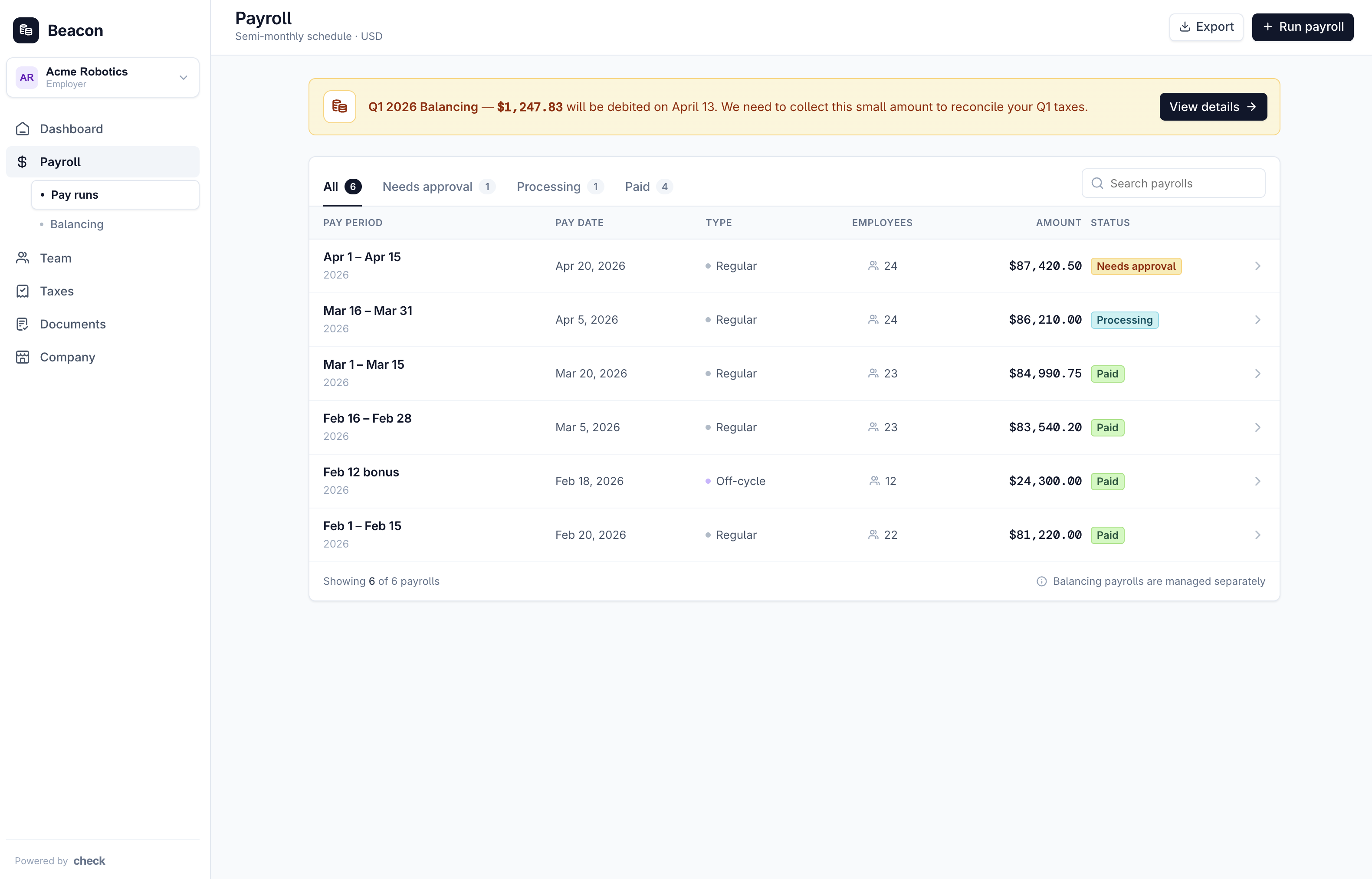
When a balancing fulfillment is detected and cash_requirement != 0, surface a prominent banner or alert that points the employer to a detail view.
The banner should include:
- Quarter identifier (e.g. "Q1 2026 balancing"). Derive the quarter fields from the balancing payroll's
period_start/period_end, which span the calendar quarter being balanced (e.g.period_start2026-01-01,period_end2026-03-31→ Q1 2026). - Cash requirement (collected from / refunded to the employer). Remember, a positive amount means money will be collected from employer, a negative amount means money will be refunded to the employer.
- Expected debit/credit date (from
payment.payment_attempts[].expected_completion_date) - A single CTA linking to the detail page
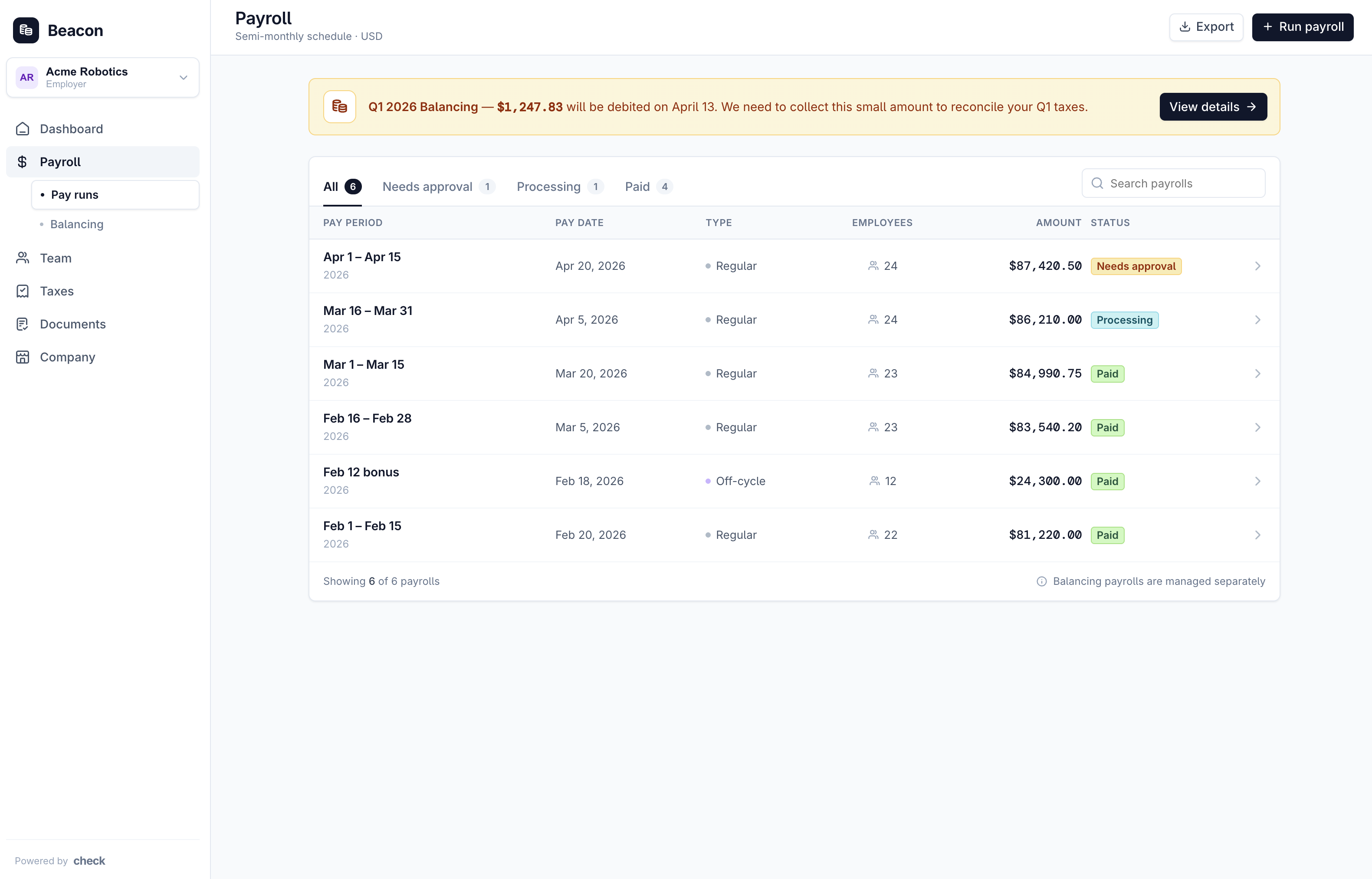
Should balancing payrolls appear in the employer's payroll list? No. A balancing payroll is system-generated, and showing it alongside regular payrolls tends to confuse employers — surface it through the dedicated banner + detail page instead. You don't need to filter it out yourself: balancing payrolls are excluded from
GET /payrollsby default.
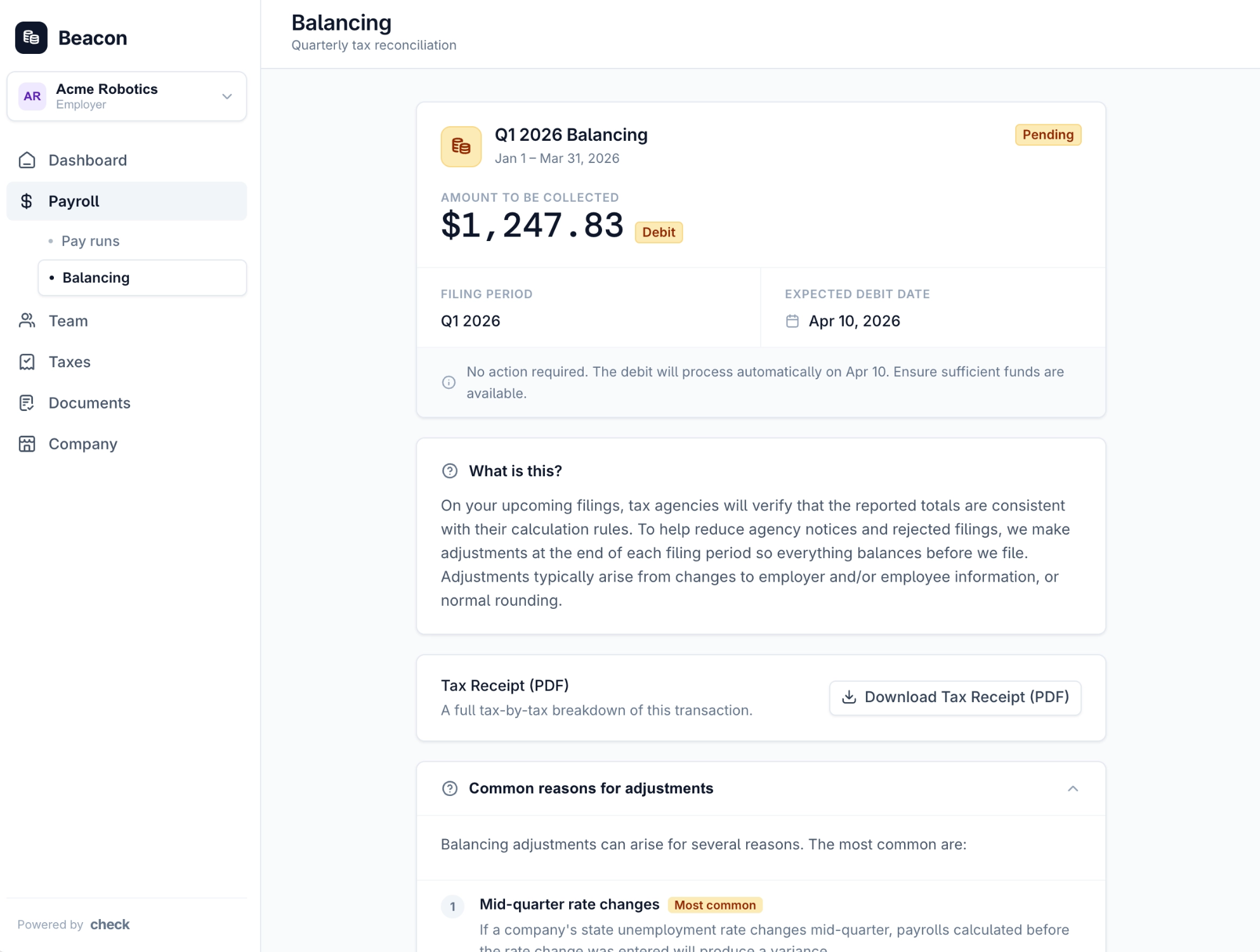
2. Balancing Payroll Detail Page
Clicking the banner takes the employer to a detail page that explains the balancing transaction in plain language and shows the total amounts involved, with a button to download the full tax-by-tax breakdown as a PDF receipt. Since the banner is temporary, also make this page reachable from a persistent entry point — e.g. a dedicated "Balancing" view populated by GET /payrolls?type=balancing.
What to show:
- Header: Quarter, total cash requirement, expected debit/credit date, status badge.
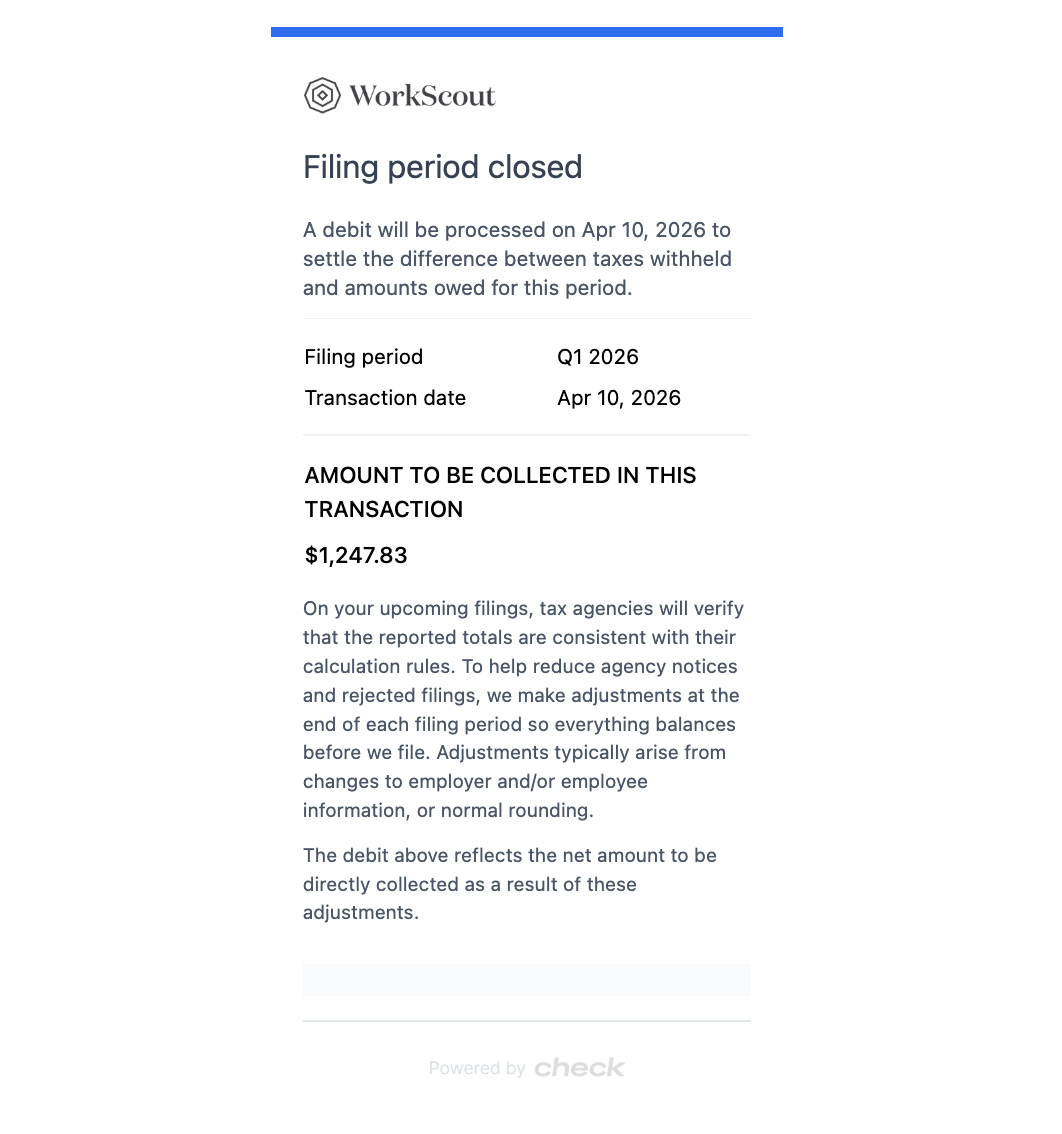
- Plain-language context: A short explainer of what a balancing transaction is, plus the common causes (see Common Variance Reasons below). You can use this language, which is also what Check surfaces in our automated employer communication: “On your upcoming filings, tax agencies will verify that the reported totals are consistent with their calculation rules. To help reduce agency notices and rejected filings, we make adjustments at the end of each filing period so everything balances before we file. Adjustments typically arise from changes to employer and/or employee information, or normal rounding."
- Receipt download: "Download Tax Receipt (PDF)" button →
GET /fulfillments/{id}/receipt.
Sourcing the debit/credit date. Read it from
payment.payment_attempts[].expected_completion_date.This is the date funds actually move and is populated as soon as the balancing payroll is approved. Note this is distinct fromcancel_deadline(the cancellation cutoff), which falls roughly one business day earlier.
3. Receipt Download
Fetch the receipt PDF via:
GET /fulfillments/{id}/receiptReturns a JSON envelope with a pre-signed URL:
{ "url": "https://check-receipts.s3.amazonaws.com/..." }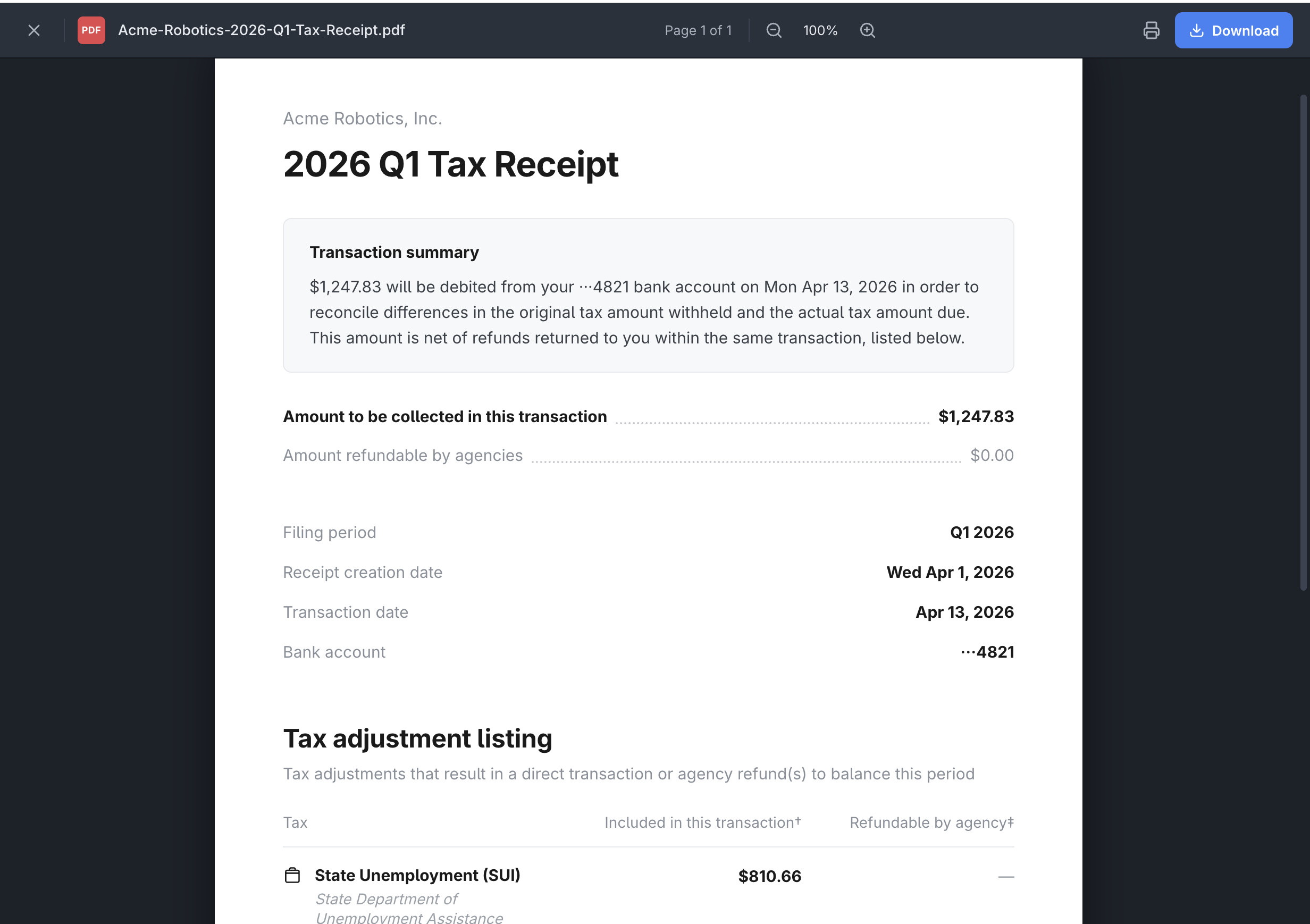
Employee-Level Impact
Most balancing variances are settled between Check and the employer and don't affect individual employees. Some do — particularly employee-paid taxes. For example, if Check withheld an employee PFML contribution during the quarter and the employer later added a private-plan exemption, balancing reverses that withholding, which affects that employee.
- How to identify it: Look for employee-paid tax adjustments on the balancing payroll. Fetch it with
GET /payrolls/{id}?include_items=trueand check each item (one per employee) fortaxes[]lines wherepayer == "employee"andamount != 0— those are the adjustments that affect that employee. - What happens next: where there's a material impact on an employee's net pay, Check will in many cases reconcile it automatically on the employee's next regular pay run — as a post-tax deduction recoupment or a reimbursement.
- Where Check does not reconcile automatically, the employer settles the difference with the employee on a separate payroll — returning an over-withholding as a reimbursement, or collecting a shortfall with a one-time post-tax deduction on a future pay run.
Quarter-End Timeline
Use the Quarter-End Playbook as the source of truth for partner-facing dates. The cadence during filing month:
| Day | Event | Partner action |
|---|---|---|
| Before quarter close | Balancing payroll drafts available | None — drafts should NOT surface to employers |
| 1st business day | Deadline for all tax account requirements | — |
| 2nd business day | Balancing payrolls approved; fulfillments created; fulfillment.created webhook fires | Surface banner + detail page |
| Days 2–7 | Cancel window open (partner ops only — do not expose to employers) | See Cancellations below |
| 8th business day | Collections/refunds sent | Status moves to processing |
| 9th business day | Funds expected in bank accounts | Status moves to paid |
| 11th of month | Early state filing deadlines begin | — |
Common Variance Reasons
Use these as the basis for your "Why am I being charged?" copy.
- (Most common) Mid-quarter rate changes. For example, if a company's state unemployment rate changes mid-quarter, then payrolls that were calculated during the quarter before the rate change was entered in Check will produce a variance.
- Exemptions added or removed. If an exemption to a tax was added or removed mid-quarter, then payrolls that were already processed may produce a variance to retroactively add or remove the tax.
- Mistakes during company setup. A company's historical payrolls may have been entered with incorrect subject wages or tax amounts.
- Rounding throughout the quarter. Simple rounding differences between calculating a tax payroll by payroll vs. in aggregate on the entire quarter may produce minor variances.
- Other agency-imposed requirements. For example, credit reduction states for FUTA are announced in November every year, and will appear as tax variances for employers in the affected states in Q4.
- Additional variances. When Check is filing, there may be times where we realize an additional collection or refund is required, resulting in additional debits or credits to your employers throughout the filing month.
Cancellations (Partner Internal Use Only)
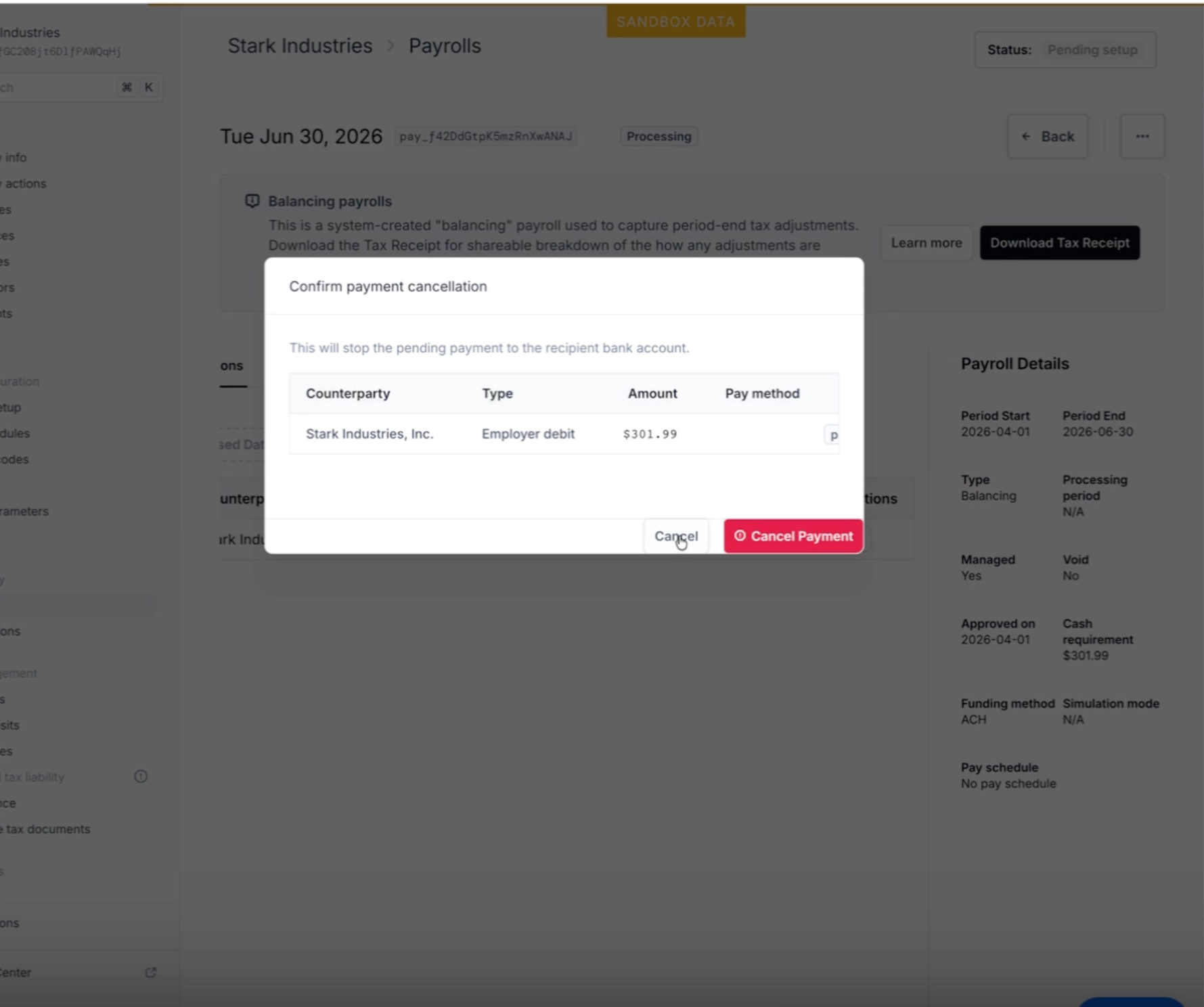
Recommendation: do not expose cancel/pause actions to employers. Reserve this capability for your own support and operations team.
The Payment API supports cancelling a balancing payment:
POST /payments/{payment_id}/cancelThe Payment object exposes eligibility directly — use these fields rather than computing them yourself:
| Field | Use for |
|---|---|
can_cancel | Whether cancel is currently eligible |
cancel_deadline | When the cancel window closes |
can_retry | Whether the payment can be retried after a failure |
Why we recommend not exposing this to employers:
- Cancelling a balancing payment moves the balancing payroll to
failed. - Failing to fund a balancing payroll may cause filings to become blocked. The agency may assess penalties & interest if the payment is not retried in time for the funds to settle before the filing is closed. (Filings only become blocked when they are funded by ACH debit, which requires the tax payment to be fully funded before the filing can be sent.)
If an employer asks to cancel, route the request through your support team. Your team can make the call and invoke the cancel endpoint themselves via Console. Note: reopening a cancelled balancing payroll requires Check support — partners cannot self-serve this action.
Communications & Notifications
Check provides employer-facing Communication objects you can subscribe to for direct notifications:
filing_period_closed— Fires when a balancing payroll is approved. Can include the Tax Receipt PDF as an attachment.tax_transfer_canceled— Fires when a balancing payment is canceled.
If you were already subscribed to these from a prior quarter, no changes are needed — they are unchanged. The new fulfillment fields complement these communications by letting you render the data in your own UI, in addition to (or instead of) the email-style notification.
Endpoint Reference
Fulfillments
GET /fulfillments— List fulfillmentsGET /fulfillments/{id}— Retrieve a fulfillment (includestotals)GET /fulfillments/{id}/receipt— Pre-signed URL for the Tax Receipt PDF
Payments
GET /payments/{id}— Retrieve a payment (includesparent_type,parent_id,can_cancel,cancel_deadline,can_retry, andpayment_attempts[], each withexpected_completion_date— the expected debit/credit date)POST /payments/{id}/cancel— Cancel a payment
Payrolls
GET /payrolls/{id}— Retrieve a payroll (includestype,status)GET /payrolls?type=balancing&status=pending— List approved (finalized, not-yet-paid) balancing payrolls. There is noapprovedstatus; an approved balancing payroll ispending.
Webhooks
fulfillment.created— fires ~1–2 minutes after balancing payroll approvalfulfillment.updated,fulfillment.deleted,fulfillment.status_change— see Webhook Event Types for the full catalog
Updated 19 days ago