

Generating Paystubs
Generating paystubs for your employees
Paystubs are used by employees to understand their pay and often serve as proof of income. They are also subject to a patchwork of state-by-state compliance regulations.
Check provides a paystubs endpoint for each employee that makes compliance and rendering easy. List employee paystubs returns the employee's paystubs in no guaranteed order, in the standard paginated response type, and Get a paystub returns an employee's paystub for a single payroll, and can return as JSON or rendered as a PDF.
When paystubs are available
Paystubs become available as soon as a payroll is approved. Approval moves the payroll to pending and saves its calculated taxes, net pay, and benefits (see Life of a Payroll). From then on you can list or retrieve an employee's paystub, as JSON or PDF, while the payroll is pending, processing, paid, or partially_paid. You don't need to wait for the payroll to reach paid. Draft payrolls, which haven't been approved, don't have paystubs.
The status filter on List employee paystubs accepts pending.
Paystub PDF
To return a Check-designed paystub as a PDF, make a request to the Get a paystub endpoint with the HTTP header Accept: application/pdf. Check will return a fully rendered paystub for the employee. Note that the Check logo on a paystub can be easily replaced with a partner’s logo.
GET /employees/<employee_id>/paystubs/<payroll_id>Note: State regulations generally require that all of the information in the paystub JSON response is rendered and the paystub is printable. Directly rendering a singular paystub to PDF will satisfy this requirement.
Paystub JSON
You can also retrieve paystub data in a JSON format, if you want to provide a completely customized paystub for your companies and employees.
Make a request to the Get a paystub endpoint with the HTTP header Accept: application/json to retrieve all data used to render a paystub in JSON format.
Example request:
curl https://sandbox.checkhq.com/employees/emp_MRQDxt1J4mrz4HZ4XwMx/paystubs/pay_bpp9oycVBI6GHT008a8G
  -H 'Content-Type: application/pdf'
Example response:
{
   "payroll": "pay_904CPnfvRvNLo9Itg44Q",
   "payday": "2021-05-21",
   "period_start": "2021-04-24",
   "period_end": "2021-05-07",
   "company": {
       "trade_name": "Stark Industries",
       "legal_name": "Stark Industries, Inc.",
       "address": {
           "line1": "200 Park Ave",
           "line2": null,
           "city": "New York",
           "state": "NY",
           "postal_code": "10166",
           "country": "US"
       },
       "phone": "5558675309"
   },
   "void_of": null,
   "voided_by": null,
   "employee": {
       "first_name": "Tony",
       "middle_name": null,
       "last_name": "Stark",
       "residence": {
           "line1": "630 Bedford Road",
           "line2": null,
           "city": "Tarrytown",
           "state": "NY",
           "postal_code": "10591",
           "country": "US"
       },
       "ssn_last_four": null
   },
   "earnings": [
       {
           "type": "Regular",
           "code": null,
           "earning_code": null,
           "amount": "5384.61",
           "amount_ytd": "5384.61",
           "hours": "40.00",
           "hours_ytd": "40.00",
           "name": "Regular",
           "current_earnings": [
               {
                   "description": "Regular",
                   "amount": "5384.61",
                   "hours": "40.00",
                   "workplace": "wrk_aj8gIXWZ6HelAcx18Ppw",
                   "rate": "134.615"
               }
           ]
       }
   ],
   "reimbursements": [
       {
           "code": null,
           "amount": "123.43",
           "amount_ytd": "123.43",
           "current_reimbursements": [
               {
                   "description": "Office supplies",
                   "amount": "123.43"
               }
           ]
       }
   ],
   "employee_taxes": [
       {
           "amount": "333.85",
           "amount_ytd": "333.85",
           "description": "FICA"
       },
       {
           "amount": "920.65",
           "amount_ytd": "920.65",
           "description": "Federal Income Tax"
       },
       {
           "amount": "78.08",
           "amount_ytd": "78.08",
           "description": "Medicare"
       },
       {
           "amount": "27.52",
           "amount_ytd": "27.52",
           "description": "New York Family Leave Benefits"
       },
       {
           "amount": "1.20",
           "amount_ytd": "1.20",
           "description": "New York SDI"
       },
       {
           "amount": "313.36",
           "amount_ytd": "313.36",
           "description": "New York State Tax"
       }
   ],
   "company_taxes": [
       {
           "amount": "333.85",
           "amount_ytd": "333.85",
           "description": "Employer FICA Tax"
       },
       {
           "amount": "32.31",
           "amount_ytd": "32.31",
           "description": "Federal Unemployment Tax"
       },
       {
           "amount": "78.08",
           "amount_ytd": "78.08",
           "description": "Employer Medicare Tax"
       },
       {
           "amount": "168.27",
           "amount_ytd": "168.27",
           "description": "New York State Unemployment Tax"
       },
       {
           "amount": "4.04",
           "amount_ytd": "4.04",
           "description": "New York Reemployment Fund"
       }
   ],
   "employee_benefit_contributions": [
       {
           "benefit": "401k",
           "description": "401k Benefit",
           "amount": "107.69",
           "amount_ytd": "107.69"
       }
   ],
   "company_benefit_contributions": [
       {
           "benefit": "401k",
           "description": "401k Benefit",
           "amount": "50.00",
           "amount_ytd": "50.00"
       }
   ],
   "post_tax_deductions": [
       {
           "type": "miscellaneous",
           "description": "Coffee Money",
           "calculation_method": "amount",
           "amount": "50.00",
           "amount_ytd": "50.00"
       },
       {
           "type": "child_support",
           "description": "Child Support",
           "calculation_method": "amount",
           "amount": "100.0",
           "amount_ytd": "100.00",
         	 "agency": "CO",
         	 "external_id": "12345678"
       }
   ],
   "summary": {
       "earnings": "5384.61",
       "earnings_ytd": "5384.61",
       "reimbursements": "123.43",
       "reimbursements_ytd": "123.43",
       "employee_taxes": "1674.66",
       "employee_taxes_ytd": "1674.66",
       "company_taxes": "616.55",
       "company_taxes_ytd": "616.55",
       "employee_benefit_contributions": "107.69",
       "employee_benefit_contributions_ytd": "107.69",
       "company_benefit_contributions": "50.00",
       "company_benefit_contributions_ytd": "50.00",
       "post_tax_deductions": "50.00",
       "post_tax_deductions_ytd": "50.00",
       "net_pay": "3675.69",
       "net_pay_ytd": "3675.69"
   },
   "total_hours": "40.00",
   "time_off_balances": {
       "pto_balance_hours": null,
       "sick_balance_hours": null,
       "state_covid_sick_balance_hours": null
   },
   "payment_method": "manual",
   "paystub_info": {}
}
You may also fetch all paystub data for a specific employee in JSON format with the List employee paystubs endpoint. The order of the results is not guaranteed. To read a pay history in payday order, request a date window with the start and end query parameters, page through the full window, and sort the collected results by payday.
GET /employees/<employee_id>/paystubsCustomizing Paystub Info
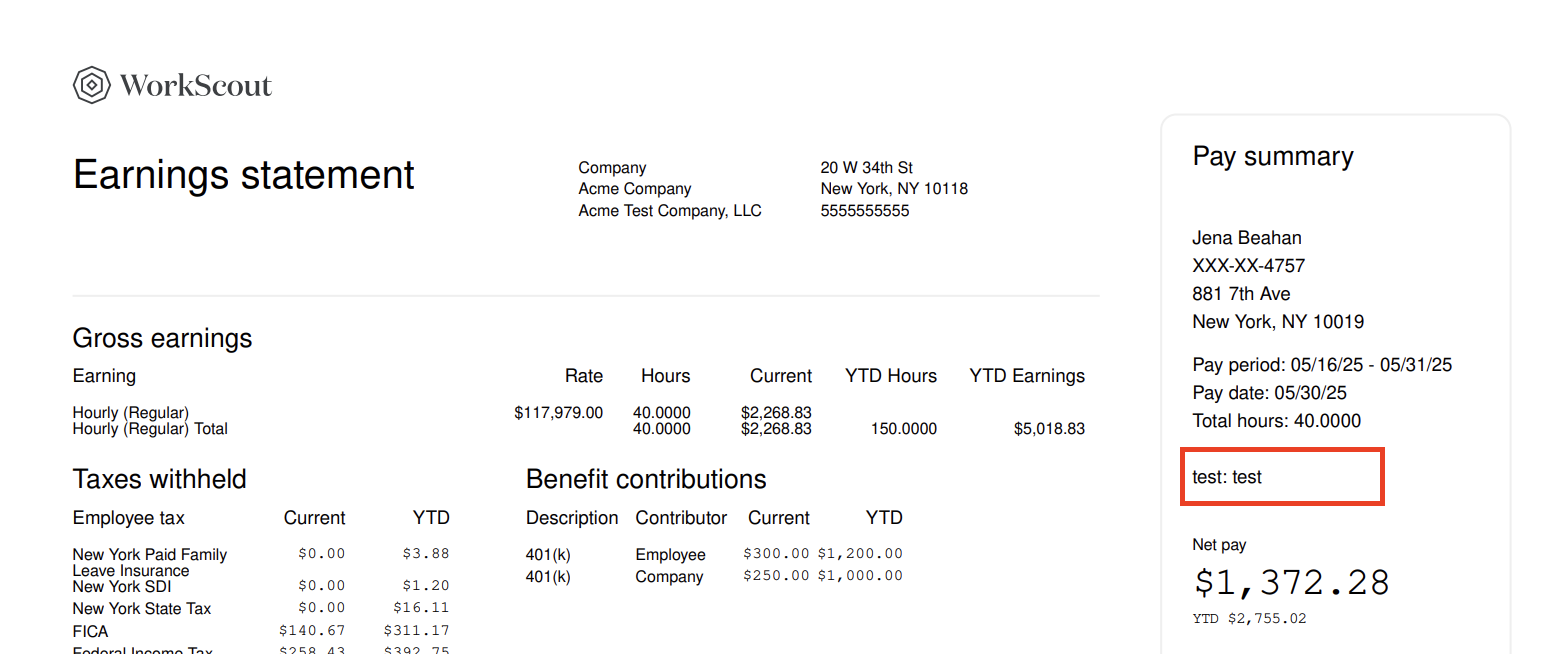
If you want to return custom information on the paystub PDF or in the paystub JSON, you can use the paystub_info object on Payroll Items. This object allows you to define arbitrary key, value pairs that get returned on both the PDF and JSON paystub responses. You can add up to 15 keys, and a total of 500 characters (the total length of all keys and values) with paystub_info on a given payroll item.
If provided, paystub_info is displayed on paystub PDFs under the Pay summary pane on the right side. For example:
Updated 25 days ago