

Tax Filings
This guide explains how to use Check’s filing-related APIs
The Legacy Tax Filings API will be deprecated on December 31, 2025. The Filings API replaces it.
Overview
The Tax Filings API allows you to do two key things:
- Determine what filings Check will file on behalf of a company in the future based on its payroll setup and activity.
- Query for information (including status) about tax filings, for companies and employees, in ~real time.
If you would like to learn more about how to generate previews of company and employee tax documents, or download them in bulk, please refer to the Tax Packages guide.
Why this matters for your product
- Proactive visibility: You can show customers what’s coming due and what’s already filed without stitching together multiple data sources.
- Clear ownership: Blocked states include actionable reasons so employers or partners can resolve issues quickly, ensuring Check can file accurate returns for employers in a timely fashion.
- Reliable timelines:
status_historylets you render clean, comprehensible progress views and notifications.
What is a filing?
A "Filing" represents a specific tax return Check prepares and submits to a government agency for a company for a given period and jurisdiction. It exists for both upcoming obligations and historical returns, so partners can see what Check plans to file and what has already been filed, all in one place
Each Filing includes core identifiers and timestamps to anchor it in your product:
id,company,year,period,period_start,period_end, and a human-readablelabel.due_at: the date the return is due, if applicable. This isnullfor amendment filings.filed_at: when the filing reached thefiledstatus, if applicable.closed_at: when the underlying filing was closed, if applicable.document: the ID of the final filing document, when available.amendsandamended_byto show amendment relationships.filing_attemptsto indicate how many times Check attempted to file the return.statusandstatus_historyto track lifecycle changes over time.
Conceptually, a Filing is the end-to-end life of a single return for a company and period. That includes:
- Visibility before filing: upcoming returns that Check plans to file.
- Real-time progress: whether a return is ready to file, blocked, in progress, or complete.
- Outcomes and follow-ups: agency acceptance, rejections, and any required amendments.
- Related documents: links to the authoritative PDF once it’s available.
Filing status model
Filings use a small, stable set of user-facing statuses. You can rely on the status field for current state, and status_history for a chronological trail of changes.
Common statuses you will see:
pending: The filing applies and is being prepared to file. It may move back topendingwhen an amendment begins.blocked: Something prevents filing. Reasons are provided so the employer or partner can understand what is blocking progress and, when applicable, take action or contact Check support. This could also mean that the agency rejected the return and a correction or amendment is required.submitted: Check submitted the filing to the agency. The date of this status is what the agency considers when assessing if the filing was on time. Filings in this status can return toblockedorpending.filed: The agency acknowledged the filing as complete. This is usually terminal, though post‑filing corrections can move a return into an amendment flow.inapplicable: Check has determined the filing no longer applies to the company. Reasons might include: voided payrolls, regulatory change, updated tax elections.
Status history
status_historycaptures changes with timestamps and, when relevant, reason details. Use it to build user timelines, audit trails, and “what changed” views.
Blocked reasons
- When a Filing is blocked, the API includes a list of reason objects that identify why, plus the related resource when available. These reasons are designed to be surfaced to end users or partners so they can understand what is blocking progress and, when applicable, take action or contact Check support.
Status lifecycle diagram
The below diagram demonstrates the status lifecycle of a filing. Once a tax filing is determined to be applicable for a company at the start of a filing period, this object will be created as pending or blocked. If there are blockers preventing Check from completing a successful filing, for example invalid EINs or EINs marked as applied for, the filing will be blocked with a set of reasons enumerated in the blocked_reasons field. Blocked reasons are intended to be user-facing, but not all are self-service. Some can be resolved directly by the employer or partner, while others require Check review or support intervention. When Check submits the filing to the agency, it will move to submitted. The filing may return to pending due to validation issues with the submission file that do not require any action from you. It would then return to submitted when Check resubmits to the agency. Once the filing is acknowledged by the agency as successfully filed, the filing will be marked as filed. If the agency rejects the filing for any reason, the filing will be moved back into blocked with blocked_reasons outlining next steps.
Displaying filed datetime in your product
The filed_at field represents the datetime when Check acknowledged that the agency accepted the filing. However, the agency considers the submitted time as when the filing is on time or late. We recommend that you use the status_at datetime for the most recent submitted status as the filed timestamp in your product. If you do not want to display the submitted status, you can still use the status_at for the most recent submitted status history but update the timestamp after the filing becomes filed.
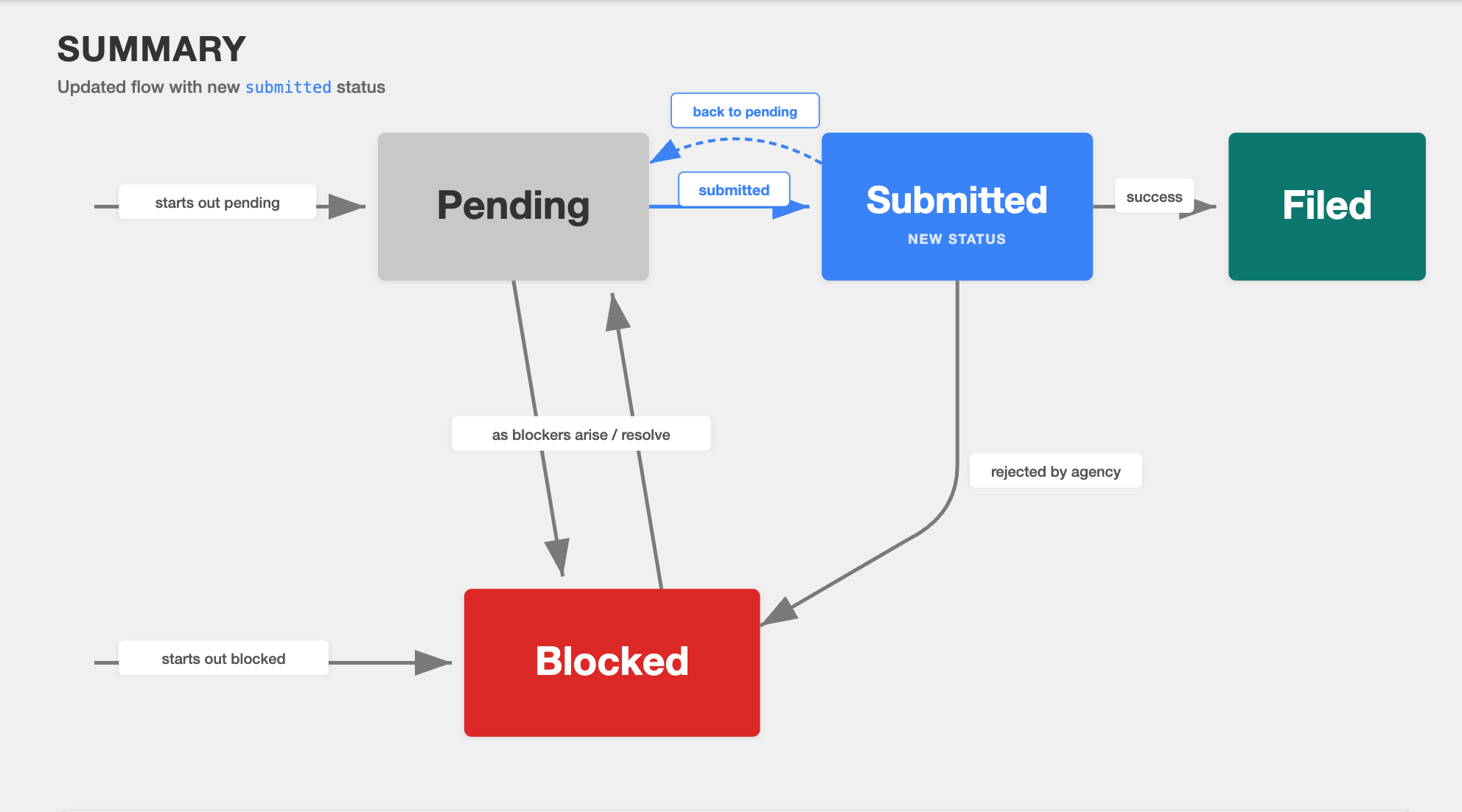
Flow diagram of status transitions for Filings
API Integration Guide
Filings API
List filings - GET /filings?company=com_vIFHhvyGN47ej1upyIT8
GET /filings?company=com_vIFHhvyGN47ej1upyIT8List filing history, plus expected upcoming filings, for one or more companies available to the authenticated provider. Use the company query parameter to filter to a single company.
{
    "next": null,
    "previous": null,
    "results": [
        {
            "id": "com_fil_GaeJoEAzbqqc2D9GMfOF",
            "company": "com_vIFHhvyGN47ej1upyIT8",
            "year": 2025,
            "period": "q1",
            "period_start": "2025-01-01",
            "period_end": "2025-03-31",
            "label": "Texas Quarterly Employment Return",
            "due_at": "2025-04-30",
            "filed_at": null,
            "closed_at": null,
            "filing_attempts": 0,
            "document": null,
            "amends": null,
            "amended_by": null,
            "status": "blocked",
            "status_history": [
                {
                    "status": "blocked",
                    "status_at": "2025-01-01T01:08:00.957364Z",
                    "blocked_reasons": [
                        {
                            "type": "applied_for_tax_id",
                            "resource_type": "company_tax_param",
                            "resource": "spa_h7zSw4NITCtef4Taf5yA",
                            "note": null
                        },
                        {
                            "type": "tpa_failure",
                            "resource_type": null,
                            "resource": null,
                            "note": "tpa failure note"
                        }
                    ]
                }
            ]
        },
        {
            "id": "com_fil_bISuBs24PYIOF4hN2wh7",
            "company": "com_vIFHhvyGN47ej1upyIT8",
            "year": 2025,
            "period": "q1",
            "period_start": "2025-01-01",
            "period_end": "2025-03-31",
            "label": "Amended Federal Quarterly Tax Return",
            "due_at": null,
            "filed_at": "2025-05-10T16:31:00Z",
            "closed_at": null,
            "filing_attempts": 1,
            "document": "doc_2345",
            "amends": [
                "com_fil_AaeJoEAzbqqc2D9GMr3R"
            ],
            "amended_by": null,
            "status": "filed",
            "status_history": [
                {
                    "status": "filed",
                    "status_at": "2025-05-10T16:31:00.957364Z",
                    "blocked_reasons": null
                },
                {
                    "status": "pending",
                    "status_at": "2025-01-01T01:04:00.957364Z",
                    "blocked_reasons": null
                }
            ]
        }
    ]
}
Get a filing - GET /filings/com_fil_GaeJoEAzbqqc2D9GMfOF
GET /filings/com_fil_GaeJoEAzbqqc2D9GMfOFGet a single filing.
{
    "id": "com_fil_GaeJoEAzbqqc2D9GMfOF",
    "company": "com_vIFHhvyGN47ej1upyIT8",
    "year": 2025,
    "period": "q1",
    "period_start": "2025-01-01",
    "period_end": "2025-03-31",
    "label": "Texas Quarterly Employment Return",
    "due_at": "2025-04-30",
    "filed_at": null,
    "closed_at": null,
    "filing_attempts": 0,
    "document": null,
    "amends": null,
    "amended_by": null,
    "status": "blocked",
    "status_history": [
        {
            "status": "blocked",
            "status_at": "2025-01-01T01:08:00.957364Z",
            "blocked_reasons": [
                {
                    "type": "applied_for_tax_id",
                    "resource_type": "company_tax_param",
                    "resource": "spa_h7zSw4NITCtef4Taf5yA",
                    "note": null
                }
            ]
        }
    ]
}
Add filing blockers - POST /filings/com_fil_AaeJoEAzbqqc2D9GMr3R/add_blockers
POST /filings/com_fil_AaeJoEAzbqqc2D9GMr3R/add_blockersAdd one or more blockers to a filing and return the updated filing. Blockers can only be added to filings with a blocked or pending status.
In production, partners can add only the held_by_customer blocker through this endpoint. In Sandbox, filed_by_customer, customer_filing_required, invalid_ssn, inactive_account, and fein_tax_id_mismatch are also accepted so that the resulting blocked states can be tested.
Request body:
{
  "blockers": ["held_by_customer"]
}
Response:
{
    "id": "com_fil_AaeJoEAzbqqc2D9GMr3R",
    "company": "com_vIFHhvyGN47ej1upyIT8",
    "year": 2025,
    "period": "q1",
    "period_start": "2025-01-01",
    "period_end": "2025-03-31",
    "label": "Federal Quarterly Tax Return",
    "due_at": "2025-04-30",
    "filed_at": null,
    "closed_at": "2025-04-25T00:00:00Z",
    "filing_attempts": 0,
    "document": null,
    "amends": null,
    "amended_by": null,
    "status": "blocked",
    "status_history": [
        {
            "status": "blocked",
            "status_at": "2025-04-20T15:30:00Z",
            "blocked_reasons": [
                {
                    "type": "held_by_customer",
                    "resource_type": null,
                    "resource": null,
                    "note": null
                }
            ]
        }
    ]
}
Possible errors:
blockers_already_presentcaused by the blocker already existing on the filingblockers_not_addablecaused by trying to add an unsupported blocker type or by attempting to add blockers to a filing in a non-supported statusmanual_issue_policy_violationcaused by a manual issue policy preventing the requested blocker change
Remove filing blockers - POST /filings/com_fil_AaeJoEAzbqqc2D9GMr3R/remove_blockers
POST /filings/com_fil_AaeJoEAzbqqc2D9GMr3R/remove_blockersRemove one or more blockers from a filing and return the updated filing.
Only blockers that are currently open on the filing can be removed with this endpoint.
Blockers that must be resolved via Zendesk, as well as non-manual or internal blockers,
cannot be removed through the API.
Request body:
{
  "blockers": ["invalid_tax_id"]
}
Response:
{
    "id": "com_fil_AaeJoEAzbqqc2D9GMr3R",
    "company": "com_vIFHhvyGN47ej1upyIT8",
    "year": 2025,
    "period": "q1",
    "period_start": "2025-01-01",
    "period_end": "2025-03-31",
    "label": "Federal Quarterly Tax Return",
    "due_at": "2025-04-30",
    "filed_at": null,
    "closed_at": null,
    "filing_attempts": 0,
    "document": null,
    "amends": null,
    "amended_by": null,
    "status": "pending",
    "status_history": [
        {
            "status": "pending",
            "status_at": "2025-04-20T15:30:00Z",
            "blocked_reasons": null,
            "note": null
        }
    ]
}
Possible errors:
blockers_not_foundcaused by attempting to remove blockers that are not currently present on the filingblockers_require_zendesk_ticketcaused by attempting to remove blockers that require a support ticketblockers_not_removablecaused by attempting to remove blockers that are not removable through the APImanual_issue_policy_violationcaused by a manual issue policy preventing the requested blocker changetoo_many_blocker_removal_attemptscaused by requesting to remove the same blocker from a company filing more than two times.
Filing blockers
held_by_customer is the only blocker that can be added via add_blockers in production. Many blockers are eligible to be removed (detailed below).
| Blocked Reason Code | Description | Employer guidance | Resource Type | Resolution path |
|---|---|---|---|---|
applied_for_tax_id | Company has not registered for an account number with the agency. | You haven't provided your the account number for this filing. Providing it will remove this blocker. | company_tax_param | This will resolve automatically when a value is added for the linked setup param. |
collection_failed | Will be released on July 16th Tax funds collection failed (e.g. due to NSF) for a filing where the agency requires full payment at the time of filig. | Resolve the failed funding to ensure full payment at the time of filing. | payment if available | This blocker clears once funding is confirmed. If funding is already expected to be available, contact Check support. |
company_bad_standing | The company has an unresolved failed debit or existing unresolved issue. | A failed payroll debit is blocking this filing. Resolve the failed debit to remove this blocker. | payment if available | This will resolve automatically when the company returns to good standing. |
customer_filing_required | The filing requires remitting penalty and interest payments to complete the original filing. Since this value can change between the time funds are collected from the customer and when they are remitted to the agency, it is best for the customer to file and pay directly. | The filing requires remitting penalty and interest payments to complete the original filing. Since this value can change between the time funds are collected from the customer and when they are remitted to the agency, it is best for you to file and pay directly. | None | Contact Check support in Zendesk. |
fein_tax_id_mismatch | The FEIN provided does not match the FEIN associated with the State EIN on file with the agency. | The FEIN provided does not match the FEIN associated with the State EIN on file with the agency. Review the IRS and state issued ID documentation to identify the issue. | company_tax_param | Removable via remove_blockers. |
filed_by_customer | Filing was rejected by the agency because it was already filed (typically by the prior payroll provider, or the company itself). | This was already filed by you or your prior provider. If you believe this is incorrect, contact your prior provider to get the filing. Then send it to support. If this is correct, no action is needed. | None | Contact Check support in Zendesk. |
held_by_customer | Company has requested a hold on the filing. | You are holding this filing. When you are ready to file, remove this blocker. | None | Removable via remove_blockers. |
inactive_account | Either an invalid Tax ID was provided by the company or the agency has closed the account due to inactivity. | Your tax account is inactive. If you are not liable for this tax, create a support ticket to opt out. If you believe the inactive status is incorrect, contact the agency directly to reactivate it. | None | Removable via remove_blockers. |
incorrect_account_setup | Either an invalid Tax ID was provided or the full setup was not completed with the agency. | The account setup for this agency does not match what the agency has on record. This is usually caused by a mismatched filing frequency or an incomplete registration. Log in to the agency portal and either update your filing frequency or complete the setup process. | None | Removable via remove_blockers. |
incorrect_experience_factor | The Experience Factor provided is incorrect for this employer. | The Experience Factor provided is incorrect for this employer. Review the agency portal to find the correct one and then update the system. | company_tax_param | Removable via remove_blockers. |
incorrect_risk_class_code | The risk class code provided is an incorrect risk class code for this employer. | The risk class code provided is an incorrect risk class code for this employer. Review the agency portal to determine what is incorrect. | None | Contact Check support in Zendesk. |
invalid_ssn | Employees have invalid SSNs that are not accepted by the agency. | One or more of your employees on this filing have invalid SSNs. These could be duplicates or placeholder values. Correct the employee SSNs and then remove the blocker. | employee | Removable via remove_blockers. |
invalid_tax_id | The agency does not recognize the tax ID provided by the company as valid or associated with that company. | Your current tax ID is not recognized by the agency. Update it and then remove the blocker. | company_tax_param | Removable via remove_blockers. |
invalid_tax_rate | The tax rate on file does not match the value with the agency. | The tax rate on file does not match the value with the agency. Update it and then remove the blocker. | company_tax_param | Removable via remove_blockers. |
late_company_reactivation | Company was reactivated after the filing month. | Your company reactivated after the filing month concluded. To file this, contact support. | None | Contact Check support in Zendesk. |
missing_historical_data | A state may require the tax return filing to reflect each tax payment that was paid to them in the quarter. If the filing does not reconcile to the payments, the agency will reject the return. | Some payments to the agency are missing from our records. Please provide a record of all payments made to the agency to support. | None | Contact Check support in Zendesk. |
missing_prior_quarter | A prior quarter was not filed and the agency prevents filing future periods until that is resolved. | A prior quarter was not filed and the agency prevents filing future periods until that is resolved. Please unblock the prior quarter, or if this is caused by a prior provider, reach out to them to file. | None | Removable via remove_blockers. |
missing_tax_funds | The filing is blocked because required tax funding has not yet been confirmed for the filing. | Tax funds are missing for this filing. Fund the payrolls that are missing funding in order to unblock this filing. | payroll if available | This blocker clears once funding is confirmed. If funding is already expected to be available, contact Check support. |
not_liable | The agency indicated that the company is not liable for this filing. | The agency believes you are not liable for this filing. If incorrect, contact the agency and then remove the blocker once they make you liable. If that is correct, contact support to opt out of this filing. | None | Removable via remove_blockers. |
other | Miscellaneous blocked reason. | This is blocked for a miscellaneous reason. Review the note for more information. | None | Removable via remove_blockers. |
poa_failure | Power of attorney is not on file with the agency. | Power of attorney is not on file or has expired. Contact the agency to grant power of attorney. Then remove this blocker. | None | Removable via remove_blockers. |
tpa_failure | Third-party administrator is not granted with the agency. | The correct level of third party administrator access is not granted. Contact the agency to grant TPA that allows for filing and then remove this blocker. | None | Removable via remove_blockers. |
tpa_inactive | Third-Party Administrator (TPA) access is on file, but it does not cover the filing period required for this return. | Third-Party Administrator (TPA) access is on file, but it does not cover the filing period required for this return. Update the covered periods with the agency. | None | Removable via remove_blockers. |
tpa_incorrect_access | Third-Party Administrator (TPA) access is on file, but the current access level does not permit filing for this account. | Third-Party Administrator (TPA) access is on file, but the current access level does not permit filing for this account. Contact the agency to update access. | None | Removable via remove_blockers. |
tpa_linked_to_other_provider | Third-Party Administrator (TPA) access is on file with another provider and must be switched over with the agency. | Third-Party Administrator (TPA) access is on file with another provider. Contact the agency to switch it over. | None | Removable via remove_blockers. |
tpa_needed_for_refile | Third-Party Administrator (TPA) access is needed for this individual filing but not for other filings. | Provide Third-Party Administrator (TPA) access through the agency portal or by contacting the agency. | None | Removable via remove_blockers. |
The Filing object
Fields non-nullable unless specified.
| field | type | description |
|---|---|---|
id | ID | ID of the Filing (prefixed with com_fil_) |
company | ID | ID of the Company |
year | int | Year in which the filing is for |
period | enum, one of annual, q1, q2, q3, q4, january, february, march, april, may, june, july, august, september, october, november, december | Filing period in the year. |
period_start | date | Start date for the filing period |
period_end | date | End date for the filing period |
label | string | Human-readable label for the filing. |
due_at |
| ISO8601 date the filing is due to the agency by. This is null for amendment filings. |
filed_at |
| ISO8601 datetime the filing status became successfully filed. |
closed_at |
| ISO8601 datetime when the underlying filing was closed. |
document |
| If available, the ID of the filing document associated with this Filing. |
filing_attempts | int, default 0 | Number of filing attempts made by Check. |
amends |
| List of original Filing IDs that this resource is an amendment of. If populated, indicator of this Filing being an amendment.Will contain only one ID for now, but may contain multiple IDs in the future. |
amended_by |
| List of Filing IDs that amend this filing. |
status | enum, one of pending, blocked, submitted,filed , orinapplicable | The current filing processing status. |
status_history | list of StatusHistory objects | List of status changes, in reverse chronological order. This includes transitions triggered by blockers being added, removed, or otherwise resolved. Each object represents a public processing status change. |
StatusHistory
| field | type | description |
|---|---|---|
status | enum | One of pending, blocked, submitted, filed , inapplicable |
status_at | datetime in UTC | When the previous status was changed to status. |
blocked_reasons | nullable list of BlockedReason objects | Optional list of blocked reasons associated with the filing while it was in the blocked status. This is null for non-blocked status history entries. |
BlockedReason
| field | type | description |
|---|---|---|
type | enum | Options enumerated below. |
resource_type | nullable string | Related resource type when available. Current values may include company_tax_param, employee, payroll, payment, or null. |
resource | nullable ID | ID of the resource for resolving the blocker |
note | nullable string | Note provided by Check operators that provides more context on the blocker reason, when available. For example, "John Smith's SSN is all 0s." |
Removing blockers in Console
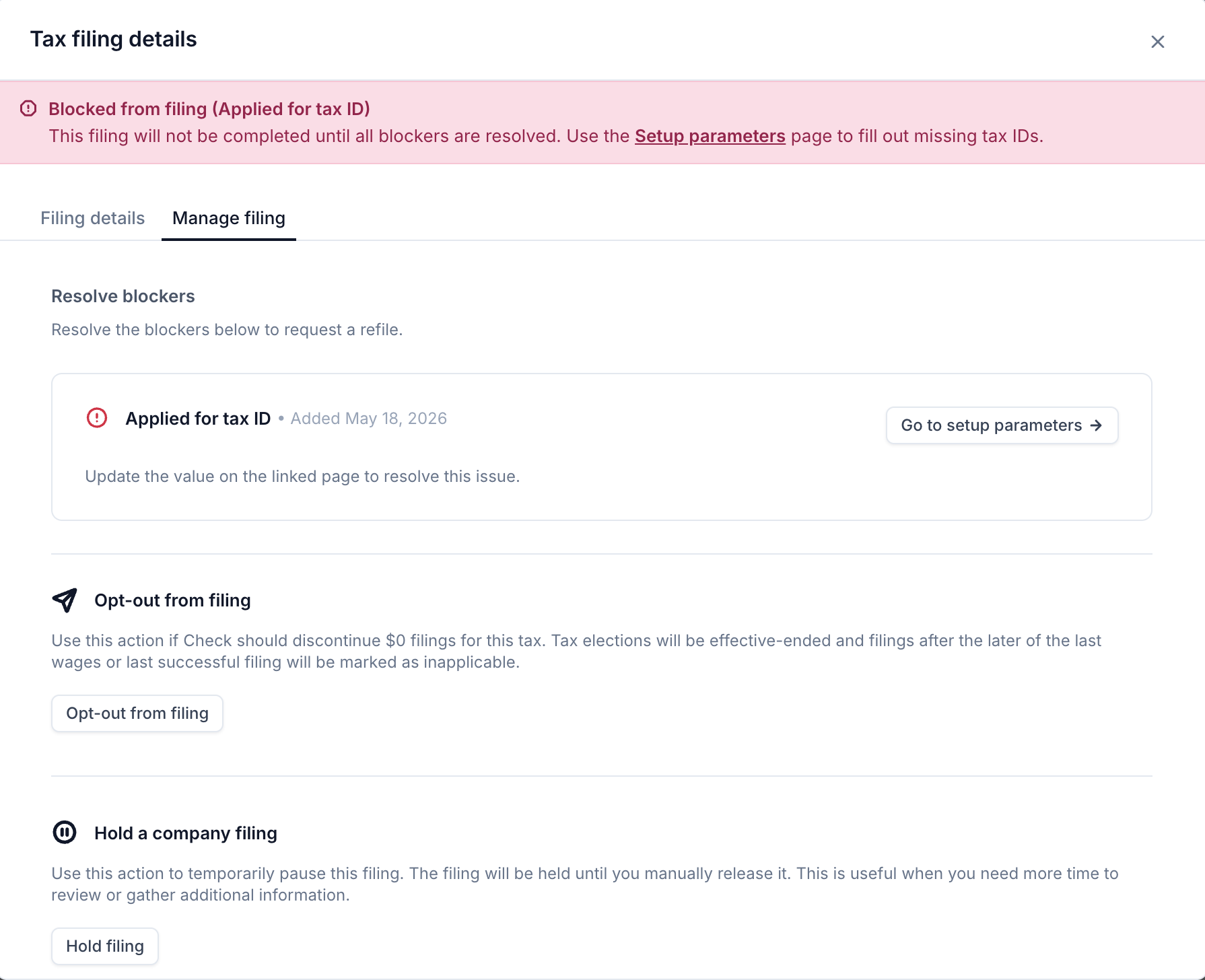
If you don't manage blockers through the API, you can review and remove a filing's blockers directly in Check Console. Open the blocked filing to see its active blockers, then remove an eligible blocker once you've resolved the underlying issue. The same blockers that are removable via the remove_blockers endpoint can be cleared here — blockers that require Check review or a support ticket can't be removed from Console and must be resolved through the path listed in the Filing blockers table above.
Updated about 1 month ago