

Payments Overview
Gain visibility into employer payroll debits and refunds, employee credit payments, and employer tax collections & refunds using the Payments API
Check’s Payments API allows you to view payments initiated by Check on behalf of employers.
A Payment object can have one of the following parent types:
- Payroll: Payment was initiated to fund the cash requirement of the payroll, by debiting the employer's account. This includes balancing payrolls (payrolls with type="balancing").
- Payroll Item: Payment was initiated to disburse earnings net of taxes to employees, by crediting the employee’s bank account
- Contractor Payment: Payment was initiated to disburse earnings to contractors, by crediting the contractor’s bank account
- Collection: Payment was initiated to fund the cash requirement of due tax payments where no payroll is associated with the payment, such as mid-quarter collections of historical tax liabilities.
- Refund: Payment was initiated to disburse over-collected tax funds where no payroll is associated with the payment, such as voided-payroll tax refunds or company termination refunds.
Note
parent_typeis distinct from the payment'stypefield, which describes what the payment is for (one ofcompany_cash_requirement,employee_net_pay,net_pay_refund,collection, orrefund).Example: Payments from balancing payrolls carry
parent_type=payrollwithtype=collection(debit - employer owes funds) ortype=refund(credit - employer is owed funds).
Payment Lifecycle
Each Payment has one or more associated Payment Attempts that have one of the following statuses in the payments life cycle:
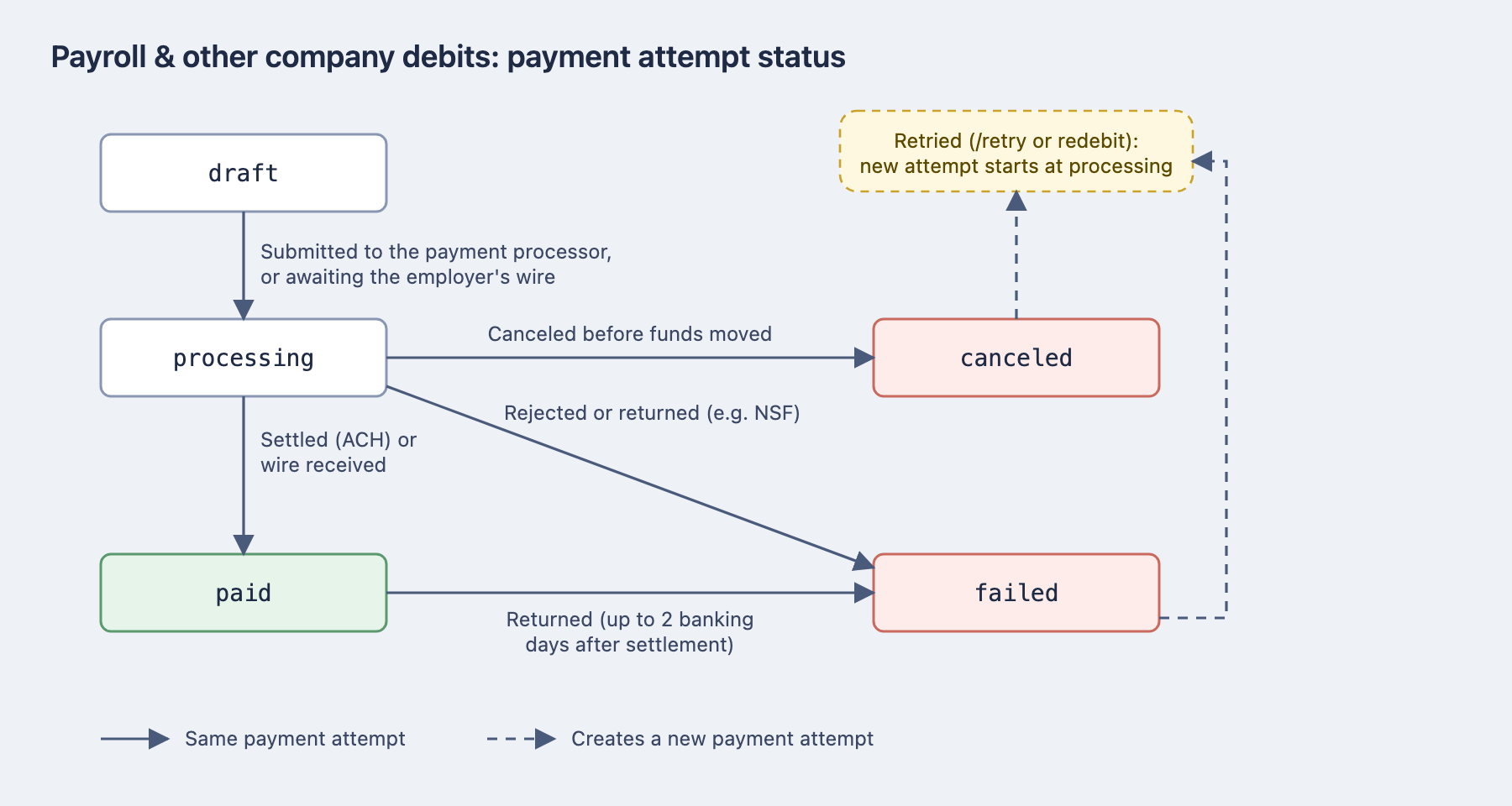
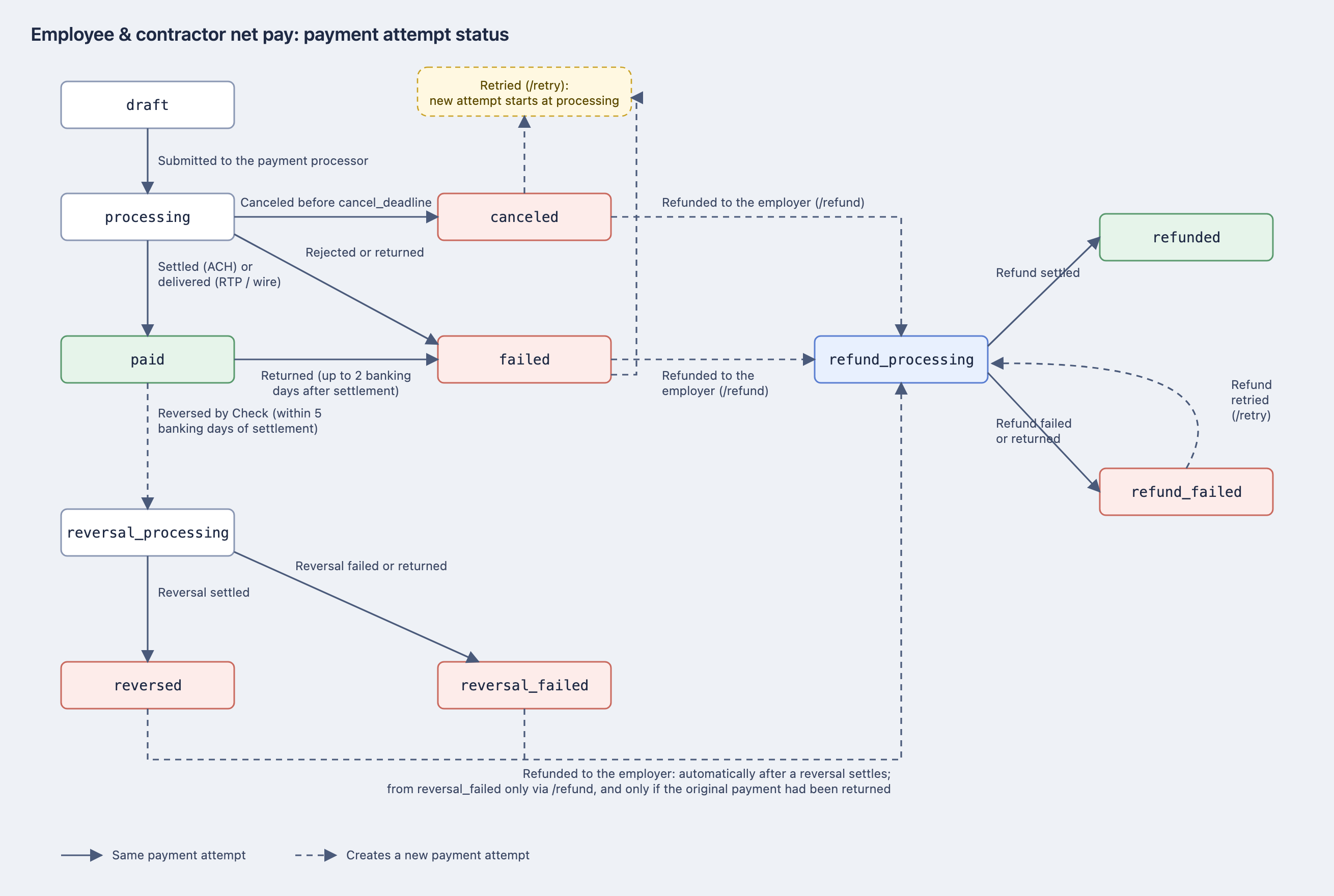
draft: Payment is created in draft state after a Payroll is approved, but not yet submitted for processing.- Note: Payments fields & associated objects related to a Payroll, such as the payment amount, direction, and the bank account associated with the payment, are set at the time of Payroll Approval. In order to make any changes to those fields and associated objects, you must re-open and re-approve the payroll.
processing: Payment has been created with the payment processor, and remains in this state until it settles.- Check transmits the payment to the bank network at the payment's
cancel_deadline(for ACH credits, generally around 1pm ET the day before payday). A payment readsprocessingfrom the moment it is created with the processor, including the period before that deadline while it is still held at Check. That pre-transmission period is the window in which the/canceland/refundendpoints can be used. - Payment Attempt sent via
ACHwill remain in this state until the end of the distribution and settlement timeline in the FedACH processing schedule - Payment Attempt sent via
Wirewill remain in this state until Check confirms the receipt of the wire payment
- Check transmits the payment to the bank network at the payment's
paid: Payment was successfully processed and funds were transferred to the recipient.- Payment Attempt sent via
ACHwill automatically transition to this status at the end of the settlement timeline in the FedACH processing schedule. This may not be a terminal state, as the ACH Protocol allows for payments to be rejected up to two banking days following the expected settlement date. - This state is terminal for Payment Attempt sent via
Wire
- Payment Attempt sent via
failed: The Payment could not be processed. Common failures include insufficient funds or incorrect account details. You can recover failed payment attempts using the/retryor/refundendpoints.refunded: Indicative of a payment that has been refunded. Once a payment has been refunded, it cannot be undone.- A payment can be refunded while it is
failed; while it isprocessingand still ahead of itscancel_deadline, before Check transmits it; or while it isprocessingafter Check has reversed an in-flight payment. A payment that has settled topaidis not refundable: the/refundendpoint returns a400with codepayment_ineligible_for_refund. - Because ACH payments can be returned for up to two banking days after settling, a payment that reads
paidtoday may transition tofailedand become refundable then. Thispaid→failed→refundedsequence is how most refunds occur. - Rather than deriving eligibility from
status, rely on thecan_refundfield on the Payment object. It reflects the exact conditions the endpoint enforces, including ones that are not visible in the status (credit direction, funded payroll, employer in good standing, and the funding debit having cleared its return window).
- A payment can be refunded while it is
Employer debits use this lifecycle:
Employee net pay payments (Payroll Item or Contractor Payment payments) use this lifecycle:
If you call the List Payments endpoint, you can view the status of any failed payments via the payments_attempt object. This will return detail on how this attempt was made i.e. via wire or ACH and whether further retries can be attempted will be indicated by the can_retry string.
Visit this section of the Docs for more details on the Payment and Payment Attempt objects.
Payment Webhooks
All payments with the above parent types also have corresponding webhooks as the statuses of their underlying payment attempts change. For more information, please see our webhook event types here.
Querying this API
To help employers understand why a certain bank account transaction occurred, a common use case is to query our /payments endpoint to return all payments of a certain direction, amount, or date.
For more information, see our List Payments endpoint here.
What is not included in this API?
This API can return all types of employer and employee related payments.
Other money movement transactions that Check enables, such as deposits of tax funds to state agencies and deposits of post-tax deduction payments, such as child support garnishments, are outside of the scope of the Payments API.
Updated 12 days ago