

Check + Basic Capital Component Integration Guide
Introduction
Basic Capital is the modern 401(k) platform. From target date funds and ETFs to alternatives and digital assets, employees choose from 6,000+ options across Traditional, Roth, and Mega Backdoor Roth with plan specialists reachable in minutes.
The Check + Basic Capital integration lets you offer 401(k) plans directly in your platform through a Check Component — an embeddable piece of UI you drop into your product via an iFrame (see Embedding a Component Guide). The Component manages the full lifecycle: introducing Basic Capital to your users, collecting consent, authorizing the integration, and handing the employer off to Basic Capital's guided enrollment. Check fetches the enrollment destination from Basic Capital on your behalf, so you do not need to manage secrets, build redirect handling, or write any integration code beyond generating the Component.
Implementation Timeline ExpectationsIn order to offer the Basic Capital integration, a commercial relationship with Basic Capital is required. The technical integration — generating and embedding the Component — typically takes days.
If interested, please reach out to your Check representative to get started.
Generating the Component
To generate the Basic Capital Component, make a POST request to the following endpoint.
https://sandbox.checkhq.com/companies/{companyId}/components/integrationsInclude the following in the body of the request:
{
  "integration_partner": "int_qhpN3HOpCLZVhL76t31K", // use this exact ID for the Basic Capital integration
  "email": "[email protected]" // the plan administrator's work email
}
Basic Capital keys the employer's enrollment invite on the administrator's work email. The Component collects and validates the email up front — the value passed at generation is used to prefill that field, and the administrator can correct it before connecting.
Federal EIN RequiredBasic Capital cannot enroll a company that has no federal EIN on file. If the company's federal tax setup is incomplete in Check, the Component disables the sign-up action and directs the administrator to complete payroll tax setup first. To avoid this dead end, generate Basic Capital Components for companies that have completed federal tax setup.
Component Experience Walkthrough
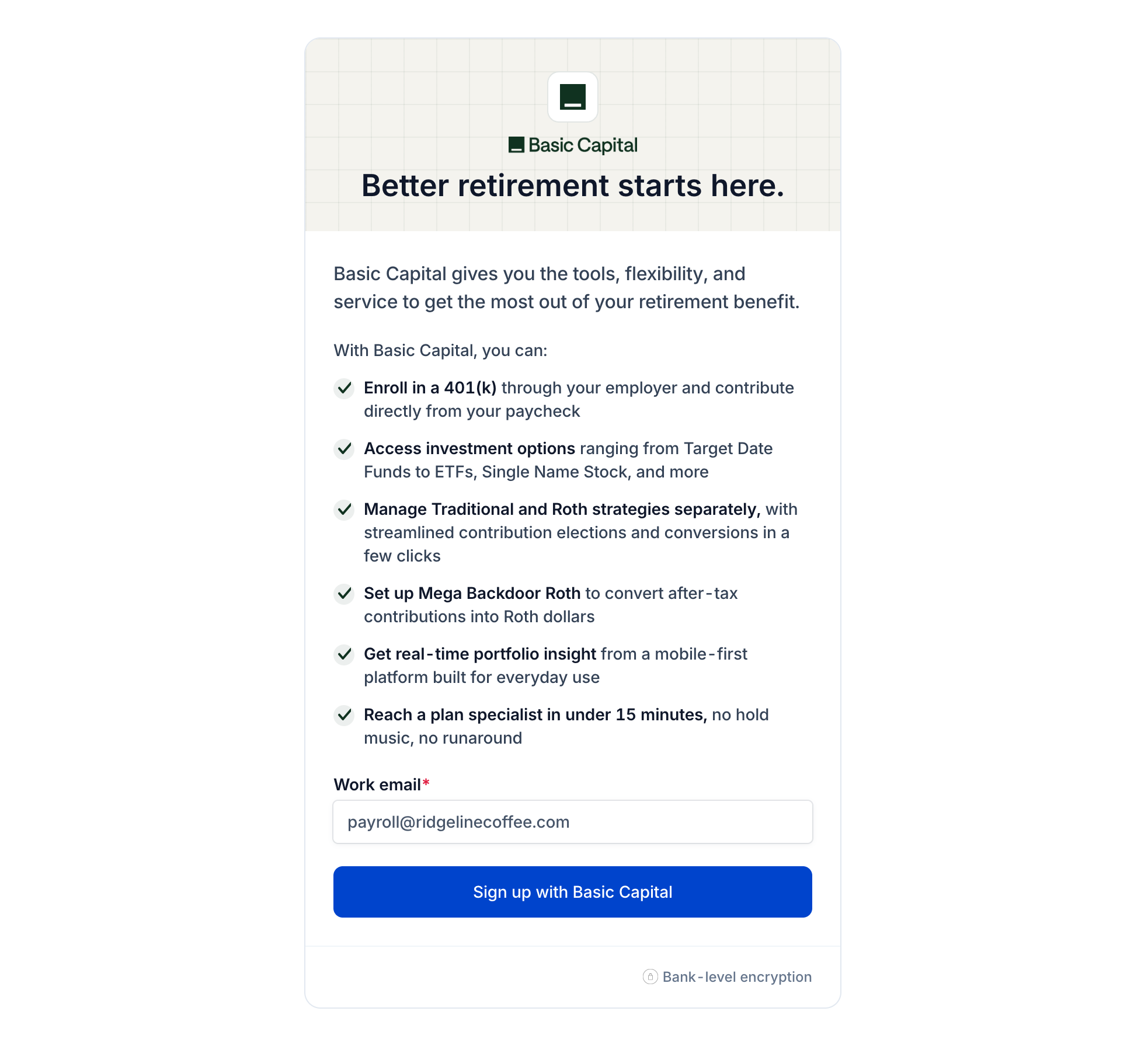
- Discovery: upon first load, the Component introduces Basic Capital with its value props and collects the administrator's work email. Clicking Sign up with Basic Capital opens a consent modal that collects authorization for Basic Capital to securely connect with Check.
-
Handoff to Basic Capital: after consent, Check authorizes the integration, retrieves a dynamic enrollment invite from Basic Capital, and opens it in a new tab. The administrator lands directly in Basic Capital's onboarding — new customers create a plan; existing Basic Capital customers are routed to sign in. Basic Capital resolves new versus returning users on their side; no special handling is required on your end.
-
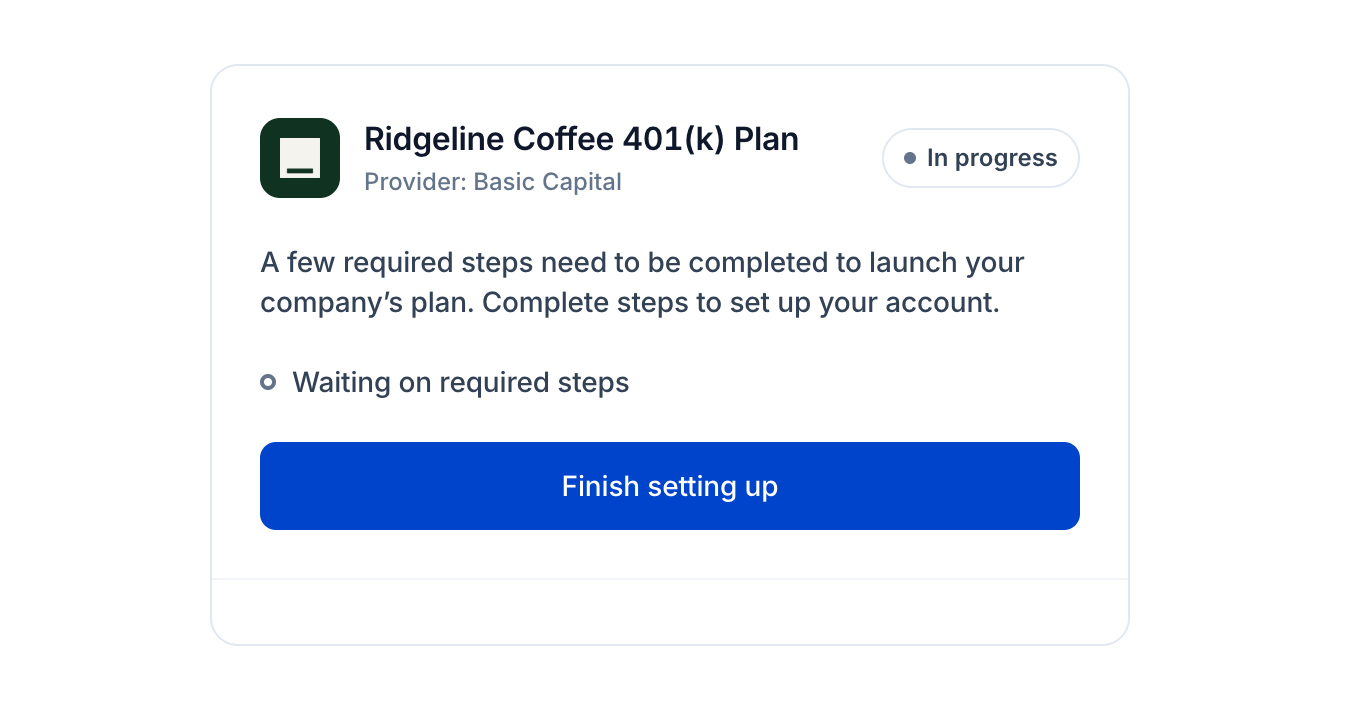
Onboarding in progress: while required steps remain in Basic Capital's onboarding, the Component shows the plan card in an "In progress" state with a Finish setting up action that returns the administrator to Basic Capital's flow — no re-consent required.
- Connected: once the plan is live, the Component shows the plan as Active with a View admin dashboard deep link into Basic Capital's employer portal for managing contributions, employees, and plan settings.
Compensation
It is recommended, but not required, to use Check's Earning Rates API to maintain earning rates for employees enrolled in Basic Capital 401(k) plans, reducing the burden on the plan administrator of manually entering compensation. Accurate compensation data supports plan eligibility and contribution calculations, nondiscrimination testing and IRS compliance reporting, per-period deferral processing, and participant statements.
Testing
To test the integration in sandbox:
- Generate the Component for a sandbox company that has completed federal tax setup (EIN on file) — Basic Capital rejects enrollment without it.
- Go through consent and confirm the handoff opens Basic Capital's enrollment in a new tab.
- Re-enter the Component to confirm the in-progress card and the Finish setting up re-entry.
Enrollment invites in sandbox are served by Basic Capital's development environment; coordinate with Basic Capital on test companies they can fully process.
FAQ
Q: Do we need to generate a shared secret or sign tokens?
A: No. Unlike custom-built retirement integrations, the Component path requires no secrets, JWT signing, or redirect implementation — Check performs the authorization and retrieves the enrollment destination from Basic Capital server-side.
Q: What happens if the administrator's company has no EIN yet?
A: The Component disables sign-up and explains that federal tax setup must be completed first. Once the EIN is on file in Check, the Component allows the connection.
Q: What does the administrator see after enrolling?
A: Until Basic Capital completes the plan setup, the Component shows the plan in progress with a re-entry point into Basic Capital's onboarding. Once active, it deep-links to Basic Capital's employer portal.
Support
Additional questions? Reach out to:
- Check: [email protected]
- Basic Capital: [email protected]
Updated 2 months ago